Smart Trader, Episode 06, Isotropic Trend Lines🔷 WHAT IS ST-EP06 — ISOTROPIC TREND LINES?
ST-EP06 is a multi-scale structural trend channel indicator built on a σ-normalized coordinate system. It is designed to solve one of the oldest unaddressed problems in technical analysis:
trend angles that cannot be compared across instruments, timeframes, or volatility regimes.
A trend line drawn on a chart appears to carry a measurable angle — yet that angle is an artifact of the display window, not a property of the market. Resize the chart horizontally and the slope flattens; compress it and the slope steepens. A given price movement on Gold daily and Bitcoin 1-hour may produce visually identical slopes on screen while reflecting entirely different structural conditions. This happens because traditional charts use a coordinate space where the vertical axis (price) and the horizontal axis (time) share no fixed dimensional relationship.
The consequence is not merely cosmetic. A trader cannot meaningfully compare the steepness of a trend on one instrument with another — or even across timeframes on the same instrument — because the weight of "one unit of price per bar" varies with the instrument's current volatility.
As the author of this indicator, I sought a coordinate system where trend angles would be an intrinsic structural property of the market, independent of charting software or display settings. The goal: a space where a 30° uptrend on EUR/USD weekly carries the same structural meaning as a 30° uptrend on NASDAQ 5-minute — indicating that each market is moving at the same rate relative to its own realized volatility.
The solution draws on the principle of dimensional analysis, well established in physics and engineering. Just as the Reynolds number normalizes fluid flow to make behavior comparable across different pipe sizes and fluid viscosities, this indicator normalizes price movement by realized volatility, producing a dimensionless space we call the Isotropic Coordinate System (ICS).
In ICS, price is expressed in natural logarithmic form and scaled by a volatility estimate (σ) derived from the Yang-Zhang (2000) method — a drift-invariant estimator that incorporates Open, High, Low, and Close data. The resulting vertical axis is dimensionless: one unit equals one standard deviation of recent realized price behavior. When trend angles are measured in this space, 45° indicates approximately one σ of movement per bar — whether the chart shows a penny stock, a major currency pair, or a commodity index.
Traditional chart coordinates assign no fixed relationship between the price axis and the time axis. Resizing the chart window changes the visual slope of the same price movement — a compressed view may show 52° while a stretched view of the same data shows 25°. The angle is a display artifact, not a market property. The Isotropic Coordinate System (ICS) addresses this by normalizing log-price by realized volatility (σ). In this space, the trend angle is designed to remain constant regardless of how the chart is displayed — because it measures price displacement in units of σ per bar, not in pixels per pixel.
🔷 HOW THE MODULES WORK TOGETHER
ST-EP06 operates as a deterministic pipeline where each stage consumes the output of the one before it:
Realized volatility estimation (σ) → Structural block construction → Monotonic direction detection → ICS angle measurement → Channel boundary fitting → Six-scale parallel analysis → Consensus aggregation → Breakout and retest state tracking → Dashboard narrative generation
The Yang-Zhang σ provides the normalization constant for every downstream computation. Price history is then partitioned into structural blocks, each distilled to a single central tendency that resists close-price bias. Consecutive block centers are compared to identify the longest uninterrupted directional segment. The slope of that segment, measured in σ-normalized space, yields the ICS angle. Four price extremes located within the segment define two log-linear channel boundaries. This complete pipeline runs independently at six temporal scales, and their independent outputs are aggregated into a structural consensus. A finite-state machine then tracks the evolving relationship between price and the primary channel — breakout, retest, confirmation, or failure — and translates it into a single-line human-readable narrative.
ST-EP06 operates as a deterministic sequential pipeline. Yang-Zhang volatility (σ) provides the normalization constant that flows into every downstream stage. Price history is partitioned into structural blocks, each reduced to a geometric mean. The longest monotonic segment determines direction, and its slope in σ-normalized space yields the ICS angle. Four price extremes define the channel boundaries. This complete pipeline runs independently at six scales — 3, 7, 13, 19, 29, and 47 bars per block — all prime numbers, chosen to minimize harmonic overlap so that multiple scales are unlikely to lock onto the same cyclical artifact. Scale 19 (highlighted) serves as the primary engine: it is the only scale that maps to the user's Trend Block Period input, and the only scale whose output drives the chart-overlay channel lines, the projection, the diamond markers, and the breakout/retest state machine. The other five scales operate at fixed periods and contribute exclusively to the cross-scale consensus count — providing structural context that a single scale cannot offer alone. When 5 or 6 of the 6 scales agree on direction, it suggests a structural trend visible across a broad range of temporal resolutions.
🔷 DATA ANCHORING
Every structural computation in ST-EP06 — volatility, block means, direction, channel coordinates, state machine transitions, and dashboard narrative — is governed by a single anchoring reference, selected through the Calculation Bar input.
Live Bar mode (default): the anchor is the current forming bar. Values update with each incoming tick. This is standard TradingView behavior and means the indicator may exhibit intra-bar repaint — the live bar's data enters all computations as it evolves.
Close Bar mode: the anchor shifts to the last fully confirmed (closed) bar. The forming bar is excluded from every computation. Values lock once a bar closes and do not change retroactively. This mode is intended for structural analysis, back-testing, and any workflow where historical consistency is a priority.
One deliberate exception is maintained in both modes: the dashboard header always displays the current live closing price (Live Exception protocol), preserving real-time price awareness regardless of how the indicator's structural engine is anchored.
Two modes, same chart moment. In Live Bar the anchor sits on the forming bar, so every value updates tick-by-tick and may repaint within the bar. In Close Bar the anchor shifts to the last closed bar, locking all structural values once the bar closes. The only exception is the dashboard header row, which always displays the live closing price in both modes, so real-time price awareness is never lost.
🔷 YANG-ZHANG VOLATILITY (σ)
The foundation of the ICS is a robust volatility estimate. ST-EP06 uses the Yang-Zhang (2000) realized volatility estimator, an academically established method that combines three variance components:
Overnight variance — capturing the gap between consecutive sessions, measured from the prior close to the current open.
Intraday variance — capturing the movement from open to close within each session.
Range-based variance — using the Rogers-Satchell (1991) estimator, which extracts additional information from the high and low prices without assuming zero drift.
These three components are blended using an optimal weight that is designed to minimize estimation error. The resulting σ updates every bar, adapts to changing market conditions, and — crucially — is drift-invariant: it is intended to remain unbiased whether the market is trending strongly or mean-reverting.
🔷 BLOCK CONSTRUCTION
Rather than analyzing individual bars, ST-EP06 partitions recent price history into consecutive non-overlapping blocks. Each block spans a user-defined number of bars (the Trend Block Period input) and is reduced to a single representative value: the geometric mean of the block's highest high and lowest low, computed in logarithmic space.
This log-midpoint serves as the block's central tendency. Unlike a simple average of closing prices, it captures the structural center of the entire price range within the block, avoiding bias toward any single price point. The number of consecutive blocks compared is controlled by the Trend Block Groups input — more groups means deeper lookback and the ability to detect longer structural trends.
Price history is partitioned into consecutive non-overlapping blocks. Each block reduces to a single log-midpoint — the geometric mean of its highest high and lowest low. Connecting the midpoints forms the representative chain used for trend detection.
🔷 DIRECTION DETECTION + ICS ANGLE
Once blocks are constructed, the engine compares their geometric means in sequence, starting from the most recent. It identifies the longest consecutive segment where each block's central tendency moves in the same direction — either consistently rising or consistently falling. A single reversal terminates the segment.
The slope of this segment is then measured in ICS space: the logarithmic price difference between the oldest and newest blocks in the segment, divided by σ, divided by the number of bars between them. The arctangent of this normalized slope produces the ICS angle in degrees.
If the absolute angle falls within the Range Threshold (a user-configurable dead zone in degrees), the direction is classified as ranging rather than trending. This threshold acts as a sensitivity filter — wider values require steeper moves before declaring a trend, narrower values respond to subtler directional shifts.
An ICS angle of 45° indicates approximately one σ of price movement per bar. An angle near 0° suggests the market may be structurally flat. Because σ adjusts for volatility and the logarithm adjusts for price level, these angles are intended to be directly comparable across any instrument and any timeframe.
🔷 CHANNEL FITTING
Within the identified trending segment, the engine locates four price extremes: the highest high, the lowest high, the highest low, and the lowest low — each paired with its bar position. These four points define two linear boundaries in ICS space.
During an uptrend, the upper boundary is fitted through the lowest high and highest high (capturing the rising ceiling), while the lower boundary is fitted through the lowest low and highest low (capturing the rising floor). During a downtrend, the fitting order reverses to capture descending structure. During a ranging market, the channel uses horizontal boundaries at the segment's absolute high and low.
All boundary computations occur in the σ-normalized logarithmic coordinate system, meaning the channel lines represent geometric (log-linear) paths in price space — curves that naturally follow multiplicative price behavior rather than additive assumptions.
Within the trending segment, four extremes — HH, LH, HL, LL — define two log-linear boundaries. In an uptrend, the upper line fits through LH and HH, the lower through LL and HL. The direction reverses the fitting order for downtrends, and a ranging market uses horizontal boundaries.
🔷 6-SCALE PARALLEL ANALYSIS
A single temporal scale may capture the trend at one resolution but miss structure at others. ST-EP06 runs the complete pipeline — volatility normalization, block construction, direction detection, ICS angle, and channel fitting — independently at six different scales: 3, 7, 13, 19, 29, and 47 bars per block. These values were chosen as prime numbers to minimize harmonic overlap between scales.
Scale 19 serves as the primary engine and maps to the user's Trend Block Period input. The other five scales use fixed periods, providing a structural context that the primary engine alone cannot offer.
The dashboard displays each scale's independent trend direction. A consensus count shows how many of the six scales agree: 5/6 or 6/6 agreement suggests a structural trend that is visible across multiple temporal resolutions, while low agreement may indicate transitional or conflicting structure.
🔷 BREAKOUT / RETEST STATE MACHINE
ST-EP06 includes a 5-state finite automaton that tracks price's structural relationship to the primary channel boundaries:
Inside — price is observed between the channel floor and ceiling. The dashboard shows the position as a percentage: distance from floor and distance to ceiling (summing to 100%).
Breakout Up / Breakout Down — price has exited above the ceiling or below the floor. The dashboard shows the breakout price and the percentage of channel width that price has moved beyond the boundary.
Retest Up / Retest Down — after a breakout, price has moved at least one σ away from the boundary (establishing distance), then returned to test it. The dashboard shows both the original breakout price and the current retest level.
Transitions between states use dynamic σ-based thresholds rather than fixed percentages, meaning the sensitivity automatically adjusts with market volatility. Additional flags track:
✓ Confirmed — a breakout that has been retested and bounced at least one σ away from the boundary.
(gap) — price crossed the entire channel width in a single transition.
Failed breakout — price re-entered the channel after initially breaking out.
Direction reset — the primary trend direction changed, wiping all breakout state.
🔷 VISUAL TOOLS
All chart-overlay elements are drawn from the primary engine (scale 19):
Channel lines — solid upper and lower boundaries from the segment start to the anchor bar, colored by trend direction (configurable up/down/range colors, width, and line style).
Projection lines — dotted forward extension of the channel slopes beyond the anchor bar, providing a visual reference for potential future support and resistance. The projection offset, width, and style are independently configurable.
Channel fill — semi-transparent shading between channel boundaries, with independent color selection and adjustable transparency. Applies to both the solid channel and projection segments.
Diamond markers (◆) — placed at the channel endpoints on the anchor bar. Hovering reveals a tooltip with the anchored close price, ceiling level, floor level, and the price's position as a percentage of channel width.
Direction label — positioned at the midpoint between segment start and projection end. Displays the trend arrow, direction text, and ICS angle (e.g., "▲ UP +7.3°"). Tooltip includes block count.
🔷 DASHBOARD
A compact information table appears at the top-right corner of the chart, organized in 5 rows:
Header — indicator name, ticker symbol, timeframe, and live price (always live under the Live Exception protocol, even in Close Bar mode).
Period — the six scale values (3, 7, 13, user's period, 29, 47) displayed across columns. The primary engine column is highlighted.
Trend — per-scale trend direction with directional arrows (▲ UP, ▼ DN, ◈ RNG) and color coding.
Agreement — consensus count (e.g., "5/6 UP") with the primary channel ceiling (▲) and floor (▼) price levels.
Narrative — a single merged row presenting the breakout/retest state machine output as a human-readable sentence with distance measurements. This row updates dynamically as price interacts with the channel.
All dashboard text, tooltips, and narrative phrases are fully localized.
🔷 ALERT CONDITIONS
ST-EP06 provides 19 alert conditions organized in 5 categories, all gated by a master Enable Alerts toggle:
D · Direction (3 alerts) — fires when the primary engine trend changes to uptrend, downtrend, or range.
B · Breakout (4 alerts) — fires on initial breakout above ceiling or below floor, and separately on confirmed breakout (retested and bounced).
R · Retest (2 alerts) — fires when price returns to test the boundary after establishing distance.
S · Structural (5 alerts) — fires on gap-through events (price crosses entire channel), failed breakouts (price re-enters channel), and direction resets (trend change wipes state).
A · Agreement (5 alerts) — fires when cross-scale consensus reaches significant thresholds: full bullish (6/6), strong bullish (5/6), full bearish (6/6), strong bearish (5/6), or range consensus (≥4/6).
Important: alerts require Calculation Bar = Live Bar. In Close Bar mode, all alert conditions are automatically suppressed and a visual warning is displayed on the chart — because Close Bar mode intentionally lags by one bar, which is semantically incompatible with live alert delivery.
🔷 LANGUAGE SUPPORT
The dashboard, all tooltips, the breakout/retest narrative, and the alert warning label are available in 7 languages:
English · Türkçe · العربية · Русский · Italiano · Português (BR) · 中文
Select the preferred language from the Language dropdown in the Display settings group. All structural and numerical outputs remain unchanged — only the display language of text elements is affected.
🔷 HOW TO USE
Apply ST-EP06 to any chart — the indicator is designed to work across instruments (equities, forex, crypto, commodities, indices) and timeframes without parameter re-optimization, because the ICS framework normalizes for volatility and price level automatically.
Start with the default settings (Period 26, Groups 5, Sigma Length 20) and observe how the channel captures the dominant structural trend. The 6-scale consensus in the dashboard may help assess whether the observed trend is isolated to one temporal resolution or confirmed across multiple scales.
The Calculation Bar setting is a structural decision: use Live Bar for real-time monitoring and alert-driven workflows; use Close Bar for analysis and back-testing where historical stability is prioritized.
The ICS angle on the direction label provides a quantitative measure of trend intensity. Comparing angles across different instruments or timeframes is one of the intended use cases of the ICS framework — a 15° angle on one chart and a 15° angle on another may suggest similar structural momentum relative to each market's own volatility.
The breakout/retest narrative in the dashboard bottom row is designed to provide context-rich status updates without requiring manual chart reading. The σ-based thresholds ensure that breakout sensitivity adapts to current market conditions rather than relying on fixed values.
🔷 SETTINGS
Calculation — Calculation Bar (Live/Close Bar anchoring), Trend Block Period (bars per block), Trend Block Groups (consecutive blocks compared), Range Threshold (ICS dead zone in degrees), Yang-Zhang Sigma Length (volatility lookback).
Channel Lines — Up Color, Down Color, Range Color, Line Width, Line Style.
Projection Lines — Projection Offset (forward bars), Projection Width, Projection Style.
Display — Language (7 options), Show Channel (toggle overlay), Show Fill (toggle shading), Show Dashboard (toggle table), Dashboard Font Size.
Channel Fill — Fill Up Color, Fill Down Color, Fill Range Color, Fill Transparency.
Alerts — Enable Alerts (master toggle, requires Live Bar mode).
🔷 DISCLAIMER
ST-EP06 is an educational and analytical tool. It is designed to provide structural context through σ-normalized trend channels and multi-scale analysis. It does not generate buy or sell signals, does not predict future price movement, and is not intended as financial advice. Historical patterns observed through this indicator do not guarantee future outcomes. All trading decisions remain the sole responsibility of the trader.
Trendtrader
Alpha Signal Engine [MarkitTick]💡 The Alpha Signal Engine is an advanced, multi-dimensional trend-following system designed to provide traders with highly filtered, high-probability market signals. At its core, it dynamically calculates a volatility-adjusted trailing band to determine the primary market direction. However, unlike traditional trend indicators that rely on a single data point, this engine passes every potential trend reversal through a rigorous, six-layer filtering mechanism. By requiring confluence across higher timeframe trends, momentum, volume, volatility regimes, and price action strength, it drastically reduces the noise and false signals inherent in choppy markets. It also features a built-in heads-up dashboard and fully formatted JSON webhook capabilities for automated trading integration.
✨ Originality and Utility
● A Dynamic, Adaptive Baseline
Standard trailing stop or trend indicators, such as the classic Supertrend, typically use a static multiplier against the Average True Range (ATR). The Alpha Signal Engine innovates by introducing a "Dynamic Factor." This factor continuously adapts the band's distance from price by factoring in the current baseline multiplier, the relative volatility (ATR normalized by price), and the immediate price change momentum. This allows the bands to tighten during periods of strong, directional momentum and widen during erratic volatility, providing a more responsive and intelligent trailing mechanism.
● The Six-Pillar Filtering Gateway
The true utility of this indicator lies in its modular filtering engine. Traders often have to clutter their charts with half a dozen indicators to confirm a setup. This script centralizes that logic. Users can selectively enable or disable filters based on their specific asset and trading style, turning the indicator into a customizable algorithmic engine. Whether you need volume confirmation, ADX trend strength, or simple RSI momentum, the script handles the complex boolean logic internally and only outputs a signal when your precise market conditions are met.
🔬 Methodology and Concepts
● Dynamic Factor Calculation
The indicator establishes its baseline trend using an upper and lower band. The distance of these bands from the median price is dictated by a dynamically calculated factor. This factor is the sum of a base value, a volatility component (ATR divided by Close, scaled by a user weight), and a price movement component (percentage change of the close, scaled by a user weight). This raw factor is then smoothed using a Simple Moving Average (SMA) to prevent erratic band shifts.
● Trend Determination
The trend direction flips when the closing price crosses the active dynamic band. If the price closes above the upper band, the trend shifts bullish, and the lower band becomes the active support. Conversely, closing below the lower band shifts the trend bearish, making the upper band the active resistance.
● The Filter Matrix
A signal is only generated when a trend flip aligns with all activated filters:
HTF Alignment: Uses the request context to pull the trend direction from a higher timeframe, ensuring you are not trading against the macro trend.
ADX Trending: Measures the Average Directional Index to ensure the market is in an active trending phase (above a defined threshold) rather than a sideways chop.
Volume Surge: Compares current volume against a Volume SMA. The current bar must exhibit a volume spike greater than the defined multiplier to confirm institutional participation.
RSI Momentum: A simple but effective gatekeeper requiring the Relative Strength Index to be above 50 for longs and below 50 for shorts.
ATR Volatility Regime: Compares the current ATR against a 50-period SMA of the ATR. It ensures the market is operating within a "normal" volatility ratio, preventing entries during extreme, unpredictable volatility spikes or dead, illiquid periods.
Candle Body Strength: Calculates the absolute size of the candle body (Open to Close) and mandates it must be larger than a specific fraction of the ATR, ensuring the signal candle has true directional conviction.
🎨 Visual Guide
● Chart Elements
Up Trend Line: Displayed as a solid, teal-colored line trailing below the price action during a bullish phase. It acts as dynamic support.
Down Trend Line: Displayed as a solid, bright pink/red line trailing above the price action during a bearish phase. It acts as dynamic resistance.
Trend Cloud (Fill): A colored gradient fill exists between the median price and the active trend line. A teal cloud visually represents bullish dominance, while a pink/red cloud represents bearish dominance.
Buy Signals: Indicated by small, teal "B" labels positioned below the signal candle.
Sell Signals: Indicated by small, pink/red "S" labels positioned above the signal candle.
● Filter Dashboard
Located in the top right corner of the chart, this HUD (Heads-Up Display) provides a real-time status check of your system.
The left column lists the available filters (HTF Align, ADX Trend, Vol Surge, RSI Gate, ATR Regime, Body Str).
The right column displays the current status of each filter.
A gray "OFF" indicator means the user has disabled the filter in the settings.
A green "ON" or "Aligned" text indicates the condition is currently met.
A red "Opposed" or unlit indicator means the condition is active but currently failing to meet the required criteria.
The bottom rows clearly state the current overarching trend direction and whether a signal is pending or waiting.
📖 How to Use
• Interpreting the System
To effectively use the Alpha Signal Engine, begin by observing the main trend lines and the color of the cloud. This provides your baseline bias. Do not take trades purely on the band flipping. Instead, rely on the explicit "B" and "S" labels.
• Signal Execution
When a "B" (Buy) or "S" (Sell) label appears, it means the price has successfully flipped the trend AND all user-activated filters in the dashboard are glowing green. This is your entry trigger. The active trend line (the teal line for longs, the pink line for shorts) serves as an ideal, dynamic stop-loss placement.
• Customizing the Engine
The system is designed to be tuned. If you are trading a highly liquid asset like major forex pairs, you may want to enable the ADX and HTF filters to catch long, sustained moves. If you are trading volatile crypto assets, enabling the Volume Surge and Candle Body filters can help you avoid fake-outs and trap wicks. Monitor the on-chart dashboard to see which filters are keeping you out of bad trades and adjust your settings accordingly.
⚙️ Inputs and Settings
• Supertrend Settings
ATR Length: The lookback period for calculating the Average True Range.
Base Factor: The starting multiplier for the dynamic bands.
Volatility & Price Change Weights: Determines how aggressively the bands react to sudden spikes in relative volatility and price momentum.
Factor Smoothing: Applies an SMA to the final dynamic multiplier to keep the bands stable.
• Filter Settings
Enable HTF Alignment: Toggle and define the higher timeframe (e.g., Daily) to align with.
ADX Settings: Toggle the filter, define the lookback length, and set the minimum trend strength threshold (default is 20).
Volume Settings: Toggle the filter, define the Volume MA length, and set the multiplier required to classify as a "surge."
RSI Settings: Toggle the filter and set the RSI lookback length.
ATR Regime Settings: Define the minimum and maximum acceptable ratios of current ATR versus historical ATR.
Candle Body Settings: Define the minimum required size of the candle body as a fraction of the current ATR.
• Webhook Action Names
These text inputs allow you to define specific payload strings (e.g., "long", "closeshort") that the indicator will output via JSON alerts, perfectly formatting the data for third-party automation services like 3Commas or PineConnector.
🔍 Deconstruction of the Underlying Scientific and Academic Framework
The Alpha Signal Engine is grounded in several well-documented tenets of quantitative financial analysis and statistical market theory.
● Volatility-Adjusted Trailing Stops
The foundation of the indicator relies on the Average True Range (ATR), introduced by J. Welles Wilder Jr. The ATR is a measure of the degree of price volatility. By tying the trailing stop (the dynamic band) to the ATR, the system acknowledges the statistical reality of market variance. The innovation here is the dynamic multiplier. By adjusting the distance based on the normalized rate of change (momentum), the script attempts to solve the lagging nature of fixed-multiplier trailing stops, utilizing principles found in adaptive moving averages (like Kaufman's AMA), where sensitivity increases alongside directional conviction.
● Multi-Dimensional Confluence Theory
The filtering engine operates on the academic principle of conditional probability and confluence. In market microstructure, no single indicator holds a permanent statistical edge.
The HTF filter is rooted in Dow Theory, prioritizing the primary trend over secondary reactions.
The ADX filter utilizes Wilder's Directional Movement Index to mathematically separate trending environments from mean-reverting environments, applying a statistical threshold to directional strength.
The Volume Surge filter relies on the Volume Price Trend concepts, positing that significant price movements must be sponsored by outsized volume to validate institutional participation and avoid anomalous low-liquidity spikes.
The ATR Regime filter applies mean-reverting principles to volatility itself (volatility clustering), ensuring that entries are only taken when the variance of the asset is within historically "normal" parameters, avoiding the fat tails of extreme market shocks.
By chaining these disparate mathematical models (trend, momentum, volume, volatility) via Boolean logic, the system mathematically reduces the frequency of trades while theoretically increasing the probability of the remaining sample size.
⚠️ Disclaimer
All provided scripts and indicators are strictly for educational exploration and must not be interpreted as financial advice or a recommendation to execute trades. I expressly disclaim all liability for any financial losses or damages that may result, directly or indirectly, from the reliance on or application of these tools. Market participation carries inherent risk where past performance never guarantees future returns, leaving all investment decisions and due diligence solely at your own discretion.
Pine Script® indicator
Breakout Trend Bar AlertsEvery trend has a starting point. It's rarely a gradual drift — it's one massive, decisive candle that breaks the market out of consolidation and kicks off a sustained move. Breakout Bar Alerts is built to catch that exact moment.
The indicator monitors price action in real time and identifies when a bar forms that dwarfs everything around it — the largest high-to-low range of any candle in the last 250 bars. These are the bars where conviction enters the market, weak hands get flushed, and a new trend begins. When one appears, you get an instant alert so you're never late to the move.
Why these bars matter:
Big range bars represent a sudden surge of momentum and volume-backed commitment from one side of the market. Bulls or bears have taken control decisively. What follows is often the beginning of a trend leg — not a random spike.
Built to filter out the noise:
The opening bar of every session is excluded entirely. That first chaotic candle never skews your data or triggers a false signal.
Only bars within your active session window are counted. Off-hours price action is completely ignored, so your benchmark is always built from real, tradeable market conditions.
Three alert conditions — Bull Breakout Bar, Bear Breakout Bar, or Both — so you only get notified for the setups you actually trade.
Inputs:
Lookback Period — how many bars back to measure the largest range (default: 250)
Enable Time Filter — restricts detection and calculations to your active trading session
Active Session — define your session window in exchange time
Bull / Bear colors — fully customizable
Best used on intraday timeframes (1m – 15m) on futures, forex, or high-volume equities. When this fires, pay attention — the trend may already be starting.
Pine Script® indicator
Trend Duration Forecast v1.04 [Far_Q]Based on Trend Duration Forecast .
This version includes a few usability improvements and a small label-placement fix.
The indicator plots a Hull Moving Average (HMA), tracks the current bullish or bearish trend duration in bars, and estimates the probable trend length from historical completed trend durations.
Pine Script® indicator
Sentiment SquareThe Sentiment Square is a multi-timeframe (MTF) and multi-length volume analysis tool designed for TradingView. It provides a top-down visualization of market conviction by calculating the ratio of bullish volume to total volume across 16 different data points simultaneously.
1.Core Logic: How it Works
The indicator calculates a Bullish Volume Ratio (BVR) for every square in the grid.
BVR = sum ( Volume of Up Candles)/ sum(Total Volume) X 100
Up Candle: Any candle where Close > Open .
Total Volume: The sum of all volume within the lookback window.
Each percentage represents the "Share of Power" held by buyers. For example, a value of 70% means bulls provided 70% of the volume, while bears provided the remaining 30%.
2. Visual Interface
The indicator uses a Transposed Matrix layout to match standard top-down trading analysis:
X-Axis: Timeframes : Moves from your lowest selected timeframe (Left) to your highest (Right).
Y-Axis: Lookback Windows: Moves from short-term momentum (Top) to long-term structure (Bottom).
Color Definitions
Green (Bullish): The percentage is above your Neutral Max (default 55%). Brighter green indicates extreme conviction (>70%).
Red (Bearish): The percentage is below your Neutral Min (default 45%). Brighter red indicates extreme selling (<30%).
Gray (Neutral): The percentage falls between 45% and 55%. This indicates a "tug-of-war" or sideways consolidation where neither side has a decisive majority.
Input Settings
Timeframes Window: Select four different intervals (e.g., 15m, 1h, 4h, 1D).
Speed Window: Set four different lookback lengths (e.g., 20, 50, 100, 200 bars).
Neutral Zone: Adjust the sensitivity of the Gray boxes. A wider range (e.g., 40%–60%) filter out more noise but responds slower to new trends.
How to Interpret the Data
Vertical Alignment (Columns): If a whole column is Green, that specific timeframe is bullish across all horizons (from fast momentum to slow structure).
Horizontal Alignment (Rows): If a whole row is Green, it means that specific "window length" is showing buying pressure across all timeframes.
The "Waiting Time" Signal: When a box is Gray, the volume is balanced. Traders typically wait for the percentage to move out of the 45%–55% range before confirming an entry.
Trend Resilience: If the 15M (tactical) squares turn Red while the 1D (structural) squares remain Green, the market is likely undergoing a healthy pullback rather than a total reversal.
Technical Limitations
Data Lag: Higher timeframe squares (like 1D or 4H) only update when their respective candles close.
Volume Requirement: This indicator requires volume data. It is most effective on Centralized Exchanges (Stocks, Crypto, Futures). On Forex, it uses "Tick Volume," which serves as a proxy for activity.
Common Trade Setup Examples
By observing the transition of colors and percentages across the matrix, you can identify high-probability market conditions.
1.The Trend Continuation (The "Dip-Buy")
Condition: The right-most columns (4H and 1D) and the bottom rows (100 and 200) are solid Green.
Setup: The top-left squares (15M / 20 Window) flip to Red or Gray.
Trigger: Wait for the 15M / 20 square to flip back to Green (above 55%).
Logic: The macro structure is bullish; the red squares indicate a temporary pullback that has now found buyers.
2. The Volatility Squeeze (The "Wait for Breakout")
Condition: A cluster of Gray squares (45%–55%) appears in the middle of the matrix.
Logic: Volume is perfectly balanced between buyers and sellers. This often precedes a massive "expansion" move.
Strategy: Avoid entering while the cluster is Gray. Wait for the majority of the cluster to flip to either solid Green or solid Red.
3. The Top/Bottom Exhaustion
Condition: All 16 squares are Vibrant Green (above 70%) or Vibrant Red (below 30%).
Logic: The market is "over-extended." While the trend is strong, the probability of a reversal increases because there are few buyers/sellers left to push the price further.
Strategy: Tighten stop-losses or look for "Divergence" where the price makes a new high but the percentages in the 20-window start dropping toward 60%.
Summary of the "Wait Time" Metric
The closer a number is to 50%, the more "waiting time" is required. As the numbers move toward 0% or 100%, the market conviction is increasing, and the "actionable" window is opening.
Additional Information:
1. Core Logic
The Sentiment Square calculates the Bullish Volume Ratio (BVR) across 16 data points. It measures "Share of Power" by dividing the volume of "Up Candles" (where Close > Open) by the total volume within a lookback window.
2. Visual Grid Layout
X-Axis (Timeframes): Displays user-selected intervals from lowest (Left) to highest (Right).
Y-Axis (Lookback Windows): Displays "Speeds" from short-term momentum (Top) to long-term structural sentiment (Bottom).
3. Color Definitions
Green (>55%): Bullish conviction. Bright green (>70%) signals extreme strength.
Red (<45%): Bearish conviction. Bright red (<30%) signals extreme selling.
Gray (45%–55%): Neutral "Waiting Time." Indicates volume balance or consolidation.
4. Common Trade Setups
The Dip-Buy: Occurs when macro columns (Right) are Green but tactical squares (Top-Left) temporarily turn Red/Gray. Entry is triggered when tactical squares flip back to Green.
Volatility Squeeze: Identified by a cluster of Gray squares. Traders wait for a majority of the cluster to flip to a solid color before entering.
Exhaustion: When all 16 squares reach extreme vibrant colors, the market is over-extended, increasing the probability of a reversal.
Pine Script® indicator
Smart SafeZone Stops [MarkitTick]💡 This script represents a sophisticated evolution of volatility-based trailing stop methodologies. It is designed to assist traders in managing trend-following positions by dynamically adjusting stop-loss levels based on market noise, directional momentum, and volume flows. Unlike static trailing stops that move by a fixed percentage or simple ATR multiples, this tool calculates the "safe zone" by analyzing how far price has penetrated against the trend over a specific lookback period, offering a granular approach to risk management that adapts to changing market conditions.
✨ Originality and Utility
The primary utility of this indicator lies in its ability to filter out market noise while remaining tight enough to protect profits during strong trends. While the classic SafeZone concept (popularized by Dr. Alexander Elder) is effective, this script introduces several modern enhancements that increase its robustness:
● Dynamic ADX Integration Standard SafeZone stops use a fixed multiplier. This script integrates the Average Directional Index (ADX) to gauge trend strength. When the trend is strong, the stop tightens (Aggressive Multiplier) to lock in profits rapidly. When the trend is weak or choppy, the stop widens (Conservative Multiplier) to prevent premature shakeouts. ● Volume-Weighted Noise Price movement on low volume is often considered "noise," while high-volume movement signifies conviction. This script optionally weights the noise calculation by Relative Volume. A downward spike on low volume will affect the stop level less than a downward spike on high volume.
● 3-Day Smoothing Mechanism To prevent the stop line from becoming too jagged or reacting to single-bar anomalies, the script applies a 3-day smoothing algorithm. It utilizes the "worst-case" scenario of the last three calculated stop levels, ensuring the stop only moves when the trend structure genuinely shifts.
🔬 Methodology and Concepts
The underlying logic operates on a "Ratchet" mechanism, meaning the stop line can only move in the direction of the trade (up for longs, down for shorts) and never retraces until a trend reversal occurs.
● Directional Noise Calculation The script separates market noise into two components: Downside Penetration (for Longs): The distance the price dips below the previous bar's low. Upside Penetration (for Shorts): The distance the price spikes above the previous bar's high. The average of these penetrations is calculated over the Noise Lookback Period .
● The SafeZone Formula The raw stop level is derived as follows: Long Stop = Previous Low - (Average Downside Noise × Multiplier) Short Stop = Previous High + (Average Upside Noise × Multiplier)
● Adaptive Multiplier Logic If Dynamic ADX is enabled: If ADX > Strong Threshold: Use Aggressive Multiplier (e.g., 1.5x). If ADX < Weak Threshold: Use Conservative Multiplier (e.g., 3.5x). Otherwise: Use the Base Safety Coefficient.
● Exhaustion Detection The script calculates the distance between the current Close price and the Active Stop. If this distance exceeds a specific multiple of the ATR (Average True Range), it flags a "Mean Reversion" or "Exhaustion" warning, suggesting price has extended too far from equilibrium.
🎨 Visual Guide
The indicator plots distinct visual elements to guide decision-making without cluttering the chart excessively.
● Trailing Stop Lines Green Line (Solid): Represents the SafeZone Long Stop. This line appears below price during an uptrend. As long as price closes above this line, the bullish bias is intact. Red Line (Solid): Represents the SafeZone Short Stop. This line appears above price during a downtrend. A close above this line signals a potential short exit or reversal.
● Trend Signals Green Triangle (Below Bar): Marks the "Bull Start." This occurs when the price crosses above the Trend Filter EMA and the trend logic flips to bullish. Red Triangle (Above Bar): Marks the "Bear Start." Indicates the start of a downtrend sequence.
● Exhaustion Warnings Yellow Labels (⚠️): These appear when price has extended significantly away from the stop line (based on the ATR Exhaustion Multiplier). This is not an immediate sell signal but a warning that the trend may be overextended and a pullback is probable.
● MTF Consensus Cloud Background Color: If enabled, the chart background changes color to reflect the Higher Timeframe (HTF) trend. Green Background: Current trend matches HTF Uptrend. Red Background: Current trend matches HTF Downtrend. Gray Background: Trends are mismatched (Consolidation/Conflict).
● Quantitative Dashboard A table located in the top-right corner displays real-time statistics: Trend: Current state (BULLISH/BEARISH). Age: Number of bars since the trend began. Stop Price: Exact price level of the trailing stop. Risk %: The percentage distance from the current Close to the Stop. If this exceeds 3%, the text turns red to highlight elevated risk. Active Mult: The current multiplier being used (Dynamic or Fixed). ADX State: Shows if the trend is Strong, Weak, or Normal.
📖 How to Use
1. Entry Timing Wait for a Trend Switch signal (Triangle). For a long entry (Green Triangle), ensure the price is above the Trend Baseline (EMA). Ideally, look for confluence with the MTF Cloud (Green Background).
2. Position Management Once in a trade, use the Trailing Stop Line as your hard exit or invalidation point. Do not manually move the stop away from price; the script automatically "ratchets" the stop tighter as the trend progresses.
3. Taking Profits Use the "Exhaustion Warnings" (⚠️) as opportunities to scale out of positions. When price moves parabolically away from the stop line, the probability of a snap-back increases.
4. Managing Chop If the dashboard shows "ADX State: WEAK," expect the stop line to remain wider. This allows the asset "room to breathe" without stopping you out on random volatility.
⚙️ Inputs and Settings
The script is highly customizable to fit different asset classes (Crypto, Forex, Stocks).
● Trend Definitions Trend Filter (EMA Length): Determines the baseline trend bias (Default: 22). Price must be above this EMA to initiate a long calculation.
● Noise Calculation Noise Lookback Period: The number of bars used to calculate average penetration (Default: 10). Base Safety Coefficient: The standard multiplier applied to the noise average (Default: 2.5). Higher values = wider stops. Use Volume Weighting: Enables the volume-adjustment logic. Use 3-Day Smoothing: Recommended keeping this TRUE to avoid stop-hunts.
● Dynamic Multiplier (ADX) Enable Dynamic ADX: Toggles the adaptive multiplier. Strong/Weak Thresholds: The ADX levels that trigger aggressive or conservative multipliers.
● Multi-Timeframe Consensus Higher Timeframe: Select the TF for the cloud background (e.g., Daily or Weekly).
● Exhaustion Warning ATR Multiplier: Defines how far price must be from the stop to trigger a warning (Default: 3.0).
🔍 Deconstruction of the Underlying Scientific and Academic Framework
The "Smart SafeZone" indicator is grounded in the statistical analysis of market noise versus signal.
● Theory of Noise Penetration Conventional stops often use Standard Deviation (Bollinger Bands) or Average True Range (Keltner Channels/Chandelier Stops). While effective, these measures assume volatility is symmetrical. This script adopts the view that directional volatility matters more. In an uptrend, upside volatility is "good" signal, while downside volatility is "noise." By explicitly calculating the average downside penetration (Low - Low), the script isolates the specific counter-trend force acting on the asset. ● Volume-Weighted Price Analysis (VWPA) The inclusion of volume weighting draws upon Dow Theory principles, which state that volume must confirm the trend. Math: Penetration × (Volume / AverageVolume) This formula asserts that a price drop on low volume is statistically less significant than a drop on high volume. By dampening the impact of low-volume moves, the stop becomes more resistant to liquidity vacuums and algorithmic stop-hunts.
● Trend Efficiency (ADX) The integration of J. Welles Wilder’s ADX (Average Directional Index) adds a dimension of Trend Efficiency. High ADX values indicate a highly efficient trend with little retracement. Mathematically, this justifies a lower standard deviation (or noise multiplier) for the stop, as the probability of a deep retracement without a trend change is lower in high-momentum environments.
⚠️ Disclaimer
All provided scripts and indicators are strictly for educational exploration and must not be interpreted as financial advice or a recommendation to execute trades. I expressly disclaim all liability for any financial losses or damages that may result, directly or indirectly, from the reliance on or application of these tools. Market participation carries inherent risk where past performance never guarantees future returns, leaving all investment decisions and due diligence solely at your own discretion.
Pine Script® indicator
Trend Harmony🚀 Trend Harmony: Multi-Timeframe Momentum & Trend Dashboard
Trend Harmony is a sophisticated multi-timeframe (MTF) analysis tool designed to help traders identify high-probability setups by spotting "Market Harmony." Instead of flipping through charts, this indicator synthesizes RSI momentum and EMA trend structures from four different time horizons into a single, intuitive dashboard.
🔍 How It Works
The core philosophy of this indicator is that the most powerful moves happen when short-term momentum aligns with long-term trend structure. The script tracks four user-defined timeframes simultaneously.
1. The Trend Scoring Engine
The indicator evaluates the relationship between a Fast EMA (default 20) and a Slow EMA (default 50) across all active timeframes.
Bullish Alignment: Fast EMA > Slow EMA.
Bearish Alignment: Fast EMA < Slow EMA.
2. The Harmony Summary
At the bottom of the dashboard, the "Summary" status calculates the total "Harmony" of the market:
🚀 FULL BULL HARMONY: All selected timeframes are in a bullish trend.
📉 FULL BEAR HARMONY: All selected timeframes are in a bearish trend.
⚠️ CAUTION (Overbought/Oversold): Triggered when the market is in "Full Harmony" but RSI levels suggest the price is overextended (>70 or <30). This warns you not to "chase" the trade.
Neutral/Mixed: Timeframes are in conflict (e.g., 15m is bullish but Daily is bearish).
🛠 Key Features
Unified RSI Pane: View four RSI lines on one chart to spot divergences or "clusters" where all timeframes bottom out at once.
Dynamic Table: Real-time tracking of:
Price vs EMA: Instant visual (▲/▼) showing if price is above/below your key averages.
Smart RSI Coloring: RSI values turn Green during "Power Zones" (0–30 or 50–70) and Red otherwise.
Full Customization: Change timeframes (1m, 5m, 1H, D, etc.), EMA lengths, and RSI parameters to fit your strategy.
📈 Trading Strategy Tips
Wait for the Sync: The "Full Harmony" status is your signal that the "tide" is moving in one direction. Look for long entries when the status is Green and short entries when it is Red.
The Pullback Entry: When the summary says "Caution (Overbought)," wait for the RSI lines to cool down toward the 50 level before entering the trend again.
RSI Clustering: When all four RSI lines converge at extreme levels (30 or 70), a massive volatility expansion is usually imminent.
Pine Script® indicator
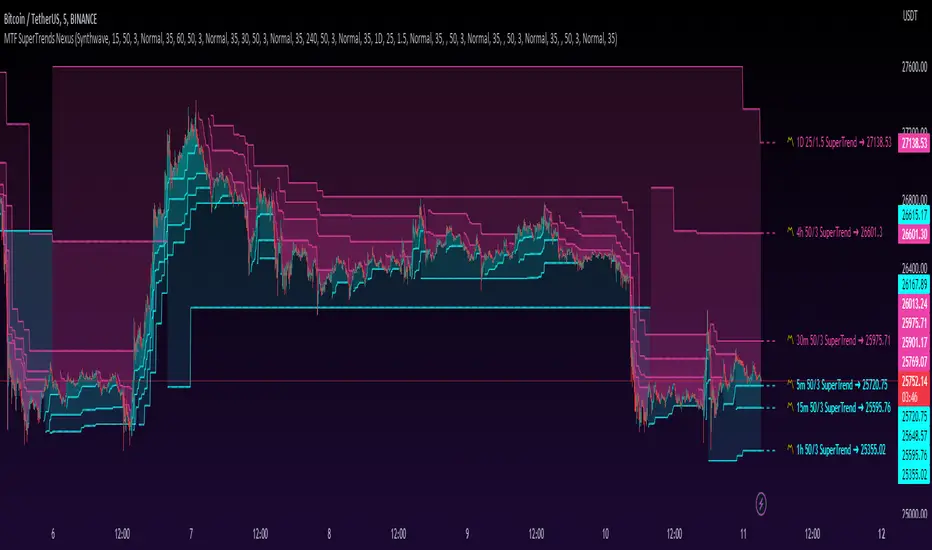
Trend Stress Quant [MarkitTick]💡This indicator combines a liquidity-based stress model with a dynamic linear regression channel to identify potential market exhaustion points and assess trend quality. By merging volume impact analysis with statistical deviation, this tool aims to highlight moments where price action may be overextended relative to the underlying liquidity conditions.
● Originality and Utility
Standard volatility indicators often rely solely on price range (like Bollinger Bands). This script introduces a Stress Engine that normalizes the relationship between Price Range (True Range) and Volume. This helps distinguish between healthy price movements and liquidity-stress events (illiquidity). Furthermore, instead of using a fixed-length channel, this tool offers a Dynamic Mode that anchors the regression channel to recent pivot points, ensuring the statistical analysis aligns with the current market structure rather than an arbitrary timeframe.
● Methodology
The script operates on two distinct mathematical models:
• Illiquidity Stress Engine
The core formula calculates a raw illiquidity metric based on the log-normal distribution of the ratio between True Range and Volume. A Z-Score (standard score) is then derived from this data over a specific lookback period. High Z-Scores indicate that price is moving disproportionately fast relative to the available volume, often a signature of panic selling or euphoric buying (exhaustion).
• Linear Regression Channel
The script calculates an Ordinary Least Squares (OLS) regression line (the line of best fit) to determine the mean price trend.
Standard Deviation Bands are plotted parallel to this mean.
Pearson Correlation Coefficient (R) is calculated to quantify the strength of the linear trend. Values closer to 1 or -1 indicate a strong trend, while values near 0 indicate a chaotic or ranging market.
📑 How to Use
Traders can utilize the visual outputs for mean reversion or trend continuation context:
• Exhaustion Signals (SE / BE Labels)
SE (Seller Exhaustion): Appears when the market is in a downtrend, but the Stress Engine detects a statistical anomaly (High Z-Score) on a down candle. This suggests panic selling may be peaking.
BE (Buyer Exhaustion): Appears when the market is in an uptrend, but the Stress Engine detects high stress on an up candle, suggesting a potential blow-off top.
• Regression Channel
The dashed middle line represents the fair value (mean) of the current trend.
The outer bands represent statistical extremes. Price interacting with the outer bands (default 2 Standard Deviations) while coincident with an Exhaustion Signal provides a high-confluence area of interest.
• Metrics Dashboard
A dashboard displays the current Trend Regime, Exhaustion Status, and Channel Width (volatility percentage).
● Settings
• Exhaustion Model
Trend Filter Length: Sets the baseline EMA to determine if the market is bullish or bearish.
Stress Threshold (Sigma): The Z-Score required to trigger an exhaustion signal (default is 2.0).
• Channel Configuration
Dynamic Pivot Mode: If enabled, automatically calculates the channel length based on recent pivots. If disabled, uses the Fixed Length.
Standard Deviations: Controls the width of the inner and outer channel bands.
📖This guide explains how to interpret and utilize signals for trading:
The script is designed primarily for Mean Reversion and Exhaustion trading strategies.
● The Core Strategy: Volatility Exhaustion
The script uses a "Stress Engine" to identify when price movement is statistically overextended relative to the available liquidity (Volume).
• Setup A: The "Seller Exhaustion" (Bullish Bounce)
Look for this setup during a downtrend to catch a temporary bottom or a reversal.
Trend Condition: The dashboard shows Bearish (Price is below the trend filter).
Trigger: The label SE (Seller Exhaustion) appears below a candle.
Why? This indicates that selling pressure was intense but likely panic-driven (High Z-Score/Stress) and may be drying up.
Confluence: Ideally, this signal appears when the price is touching or piercing the Lower Channel Band (dotted or solid lines).
Action: Traders often use this as a signal to close Short positions or enter a speculative Long (counter-trend) targeting the middle line.
• Setup B: The "Buyer Exhaustion" (Bearish Pullback)
Look for this setup during an uptrend to catch a local top.
Trend Condition: The dashboard shows Bullish .
Trigger: The label BE (Buyer Exhaustion) appears above a candle.
Why? This indicates euphoric buying on low liquidity or extreme volatility that is statistically unsustainable.
Confluence: Look for price rejection at the Upper Channel Band.
Action: Traders often use this to close Long positions or enter a Short targeting the mean.
● The Filter: Trend & Correlation
The script includes a Linear Regression Channel that quantifies the quality of the trend.
• Channel Slope
If the channel is angling steeply up or down, the trend is strong.
• Pearson R (Correlation)
The script calculates the Pearson R coefficient.
Weak Correlation: If the channel turns Gray/Neutral (or the fill becomes weak), it means the correlation is below the threshold (default 0.5).
Trading Rule: Avoid trading exhaustion signals when the channel is Gray/Neutral, as the market is likely chopping sideways with no clear direction.
● Risk Management & Targets
• Stop Loss
Since this is a volatility tool, a common technique is to place stops just outside the Outer Deviation Band (the widest line). If price expands beyond the outer band with no exhaustion signal, the trend may be entering a "runaway" phase.
• Take Profit
Target 1: The Middle Regression Line (The dashed center line). Prices tend to revert to this mean after an exhaustion event.
Target 2: The opposite channel band (e.g., if you bought at the bottom, hold until the top).
● Summary of Dashboard Metrics
The table on your chart provides a quick snapshot:
Trend Regime: Tells you if you should fundamentally look for Shorts (Bearish) or Longs (Bullish).
Seller/Buyer Status: Alerts you if the current bar is EXHAUSTED or Normal .
Channel Width %: Indicates volatility. If the width is very low (percentage is small), a breakout might be imminent (squeezing). If high, be careful of chop.
⚙️ Indicator settings
• Signal Parameters
Exhaustion & Stress Model: Controls signal sensitivity.
Trend Filter: Decides if the market is Bullish or Bearish.
Stress Threshold (Sigma): Higher values (e.g., 2.5) make the script stricter, showing fewer but potentially stronger signals.
• Channel Configuration
Dynamic Pivot Mode: If ON, the channel length auto-adjusts to recent market pivots. If OFF, it uses the Fixed Length you set.
Channel Bands: Adjusts the channel width.
Outer Deviation: The boundary for "extreme" moves. Price hitting this often signals a reversal.
• Quality Filter
Filter Weak Correlations: If enabled, the channel turns gray during choppy/sideways markets to warn you not to trust trend signals.
• Visuals
Display Options: Toggles the "Stats" dashboard and adjusts volatility coloring.
● Disclaimer
All provided scripts and indicators are strictly for educational exploration and must not be interpreted as financial advice or a recommendation to execute trades. I expressly disclaim all liability for any financial losses or damages that may result, directly or indirectly, from the reliance on or application of these tools. Market participation carries inherent risk where past performance never guarantees future returns, leaving all investment decisions and due diligence solely at your own discretion.
Pine Script® indicator
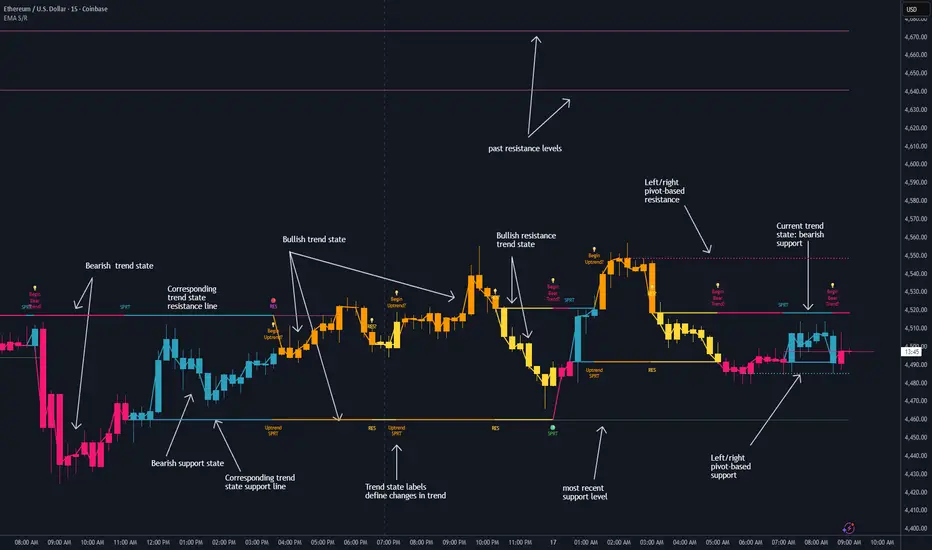
Dynamic EMA Stack Support & ResistanceEvery trader needs reliable support and resistance — but static zones and lagging indicators won't cut it in fast-moving markets. This script combines a Fibonacci-based 5-EMA stacking system and left/right pivots that create dynamic support & resistance logic to uncover real-time structural shifts & momentum zones that actually adapt to price action. This isn’t just a mashup — it’s a complete built-from-the-ground-up support & resistance engine designed for scalpers, intraday traders, and trend followers alike.
🧠 🧠 🧠What It Does🧠 🧠 🧠
This script uses two powerful engines working in sync:
1️⃣ EMA Stack (5-EMA Framework)
Built on Fibonacci-based lengths: 5, 8, 13, 21, 34, (configurable) this stack identifies:
🔹 Bullish Stack: EMAs aligned from fastest to slowest (uptrend confirmation)
🔹 Bearish Stack: EMAs aligned inversely (downtrend confirmation)
🟡 Narrowing Zones: When EMAs compress within ATR thresholds → possible breakout or reversal zone
🎯 Labels identify key transitions like:
✅"Begin Bear Trend?"
✅"Uptrend SPRT"
✅"RES?" (resistance test)
2️⃣ Pivot-Based Projection Engine
Using classic Left/Right Bar pivot logic, the script:
📌 Detects early-stage swing highs/lows before full confirmation
📈 Projects horizontal S/R lines that adapt to market structure
🔁 Keeps lines active until a new pivot replaces them
🧩 Syncs beautifully with EMA stack for confluence zones
🎯🎯🎯Key Features for Traders🎯🎯🎯
✅ Trend Detection
→ EMA order reveals real-time bias (bullish, bearish, compression)
✅ Dynamic S/R Zones
→ Historical support/resistance levels auto-draw and extend
✅ Smart Labeling
→ “SPRT”, “RES”, and “Trend?” labels for live context + testing logic
✅ Custom Candle Coloring
→ Choose from Bar Color or Full Candle Overlay modes
✅ Scalper & Swing Compatible
→ Use fast confirmations for scalping or stack consistency for longer trends
⚙️⚙️⚙️How to Use⚙️⚙️⚙️
✅Use Top/Bottom (trend state) Line Colors to quickly read trend conditions.
✅Use Pivot-based support/resistance projections to anticipate where price might pause or reverse.
✅Watch for yellow/blue zones to prepare for volatility shifts/reversals.
✅Combine with volume or momentum indicators for added confirmation.
📐📐📐Customization Options📐📐📐
✅EMA lengths (5, 8, 13, 21, 34) — fully configurable - try 21,34,55, 89, 144 for longer term trend states
✅Left/Right bar pivot settings (default: 21/5)
✅Label size, visibility, and color themes
✅Toggle line and label visibility for clean layouts
✅“Max Bars Back” to control how deep history is scanned safely
🛠🛠🛠Built-In Safeguards🛠🛠🛠
✅ATR-based filters to stabilize compression logic
✅Guarded lookback (max_bars_back) to avoid runtime errors
✅Works on any asset, any timeframe
🏁🏁🏁Final Word🏁🏁🏁
This script is not just a visual tool, it’s a complete trend and structure framework. Whether you're looking for clean trend alignment, dynamic support/resistance, or early warning labels, this system is tuned to help you react with confidence — not hindsight.
Rembember, no single indicator should be used in isolation. For best results, combine it with price action analysis, higher-timeframe context, and complementary tools like trendlines, moving averages etc Use it as part of a well-rounded trading approach to confirm setups — not to define them alone.
💡💡💡Turn logic into clarity. Structure into trades. And uncertainty into confidence.💡💡💡
Pine Script® indicator
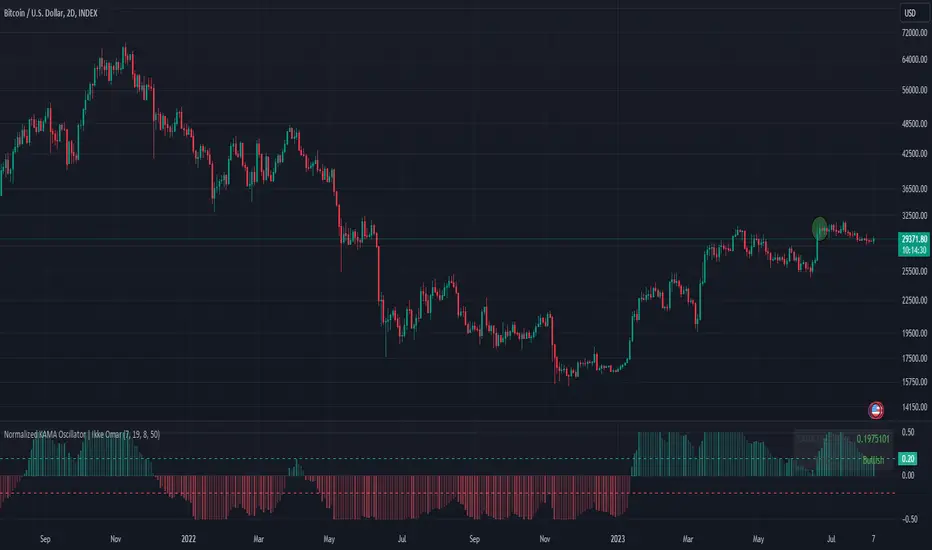
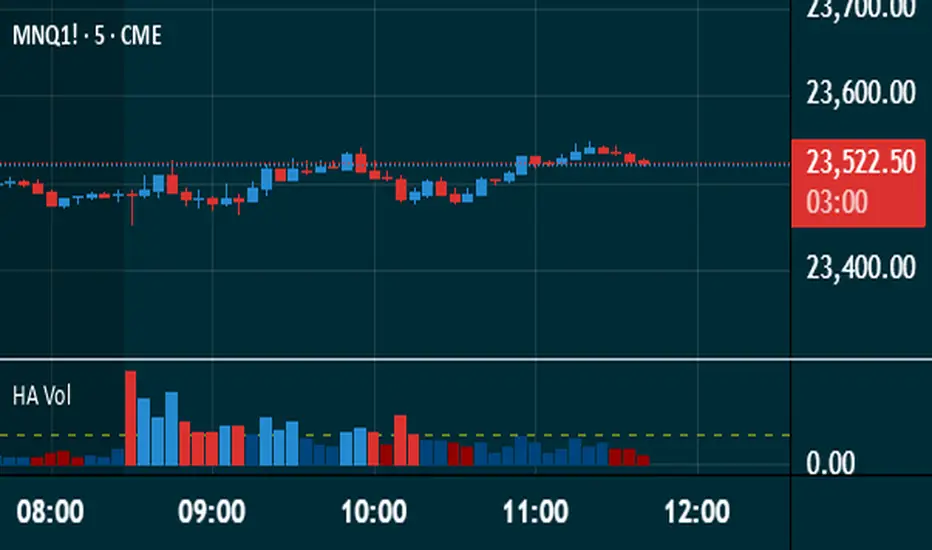
Heikin Ashi VolumeHeikin Ashi candles decrease market noise so that broader trends can be more easily visualized. In a typical chart utilizing Heikin Ashi candles, volume bars are colored in such a way that they also allow for the visualization of trends during a bullish/bearish move.
The Heikin Ashi Volume indicator allows the trader to continue to use the same volume bar coloring technique to visualize trends without having to utilize the Heikin Ashi candles, since a Heikin Ashi candle’s OHLC values are not true prices but instead based on calculations in order to provide the ‘denoising’ effect they are known for.
In addition to providing the Heikin Ashi Volume coloring effects, the Heikin Ashi Volume indicator also allows the user to set a volume threshold level where the bar colors will be darker unless volume is beyond that threshold, helping traders quickly determine if there is enough participation in the market at that time to justify taking risk in a trade when the market isn’t very active. The user has the option to show or hide the threshold line, change the colors of the bullish/bearish colors (for both above and below threshold volumes) and the option for the indicator to gradually brighten the bar colors are they approach the threshold instead of having a clear line of demarcation showing volume above or below the set threshold.
Pine Script® indicator
EMA Trend Dashboard
Trend Indicator using 3 custom EMA lines. Displays a table with 5 rows(position configurable)
-First line shows relative position of EMA lines to each other and outputs Bull, Weak Bull, Flat, Weak Bear, or Bear. EMA line1 should be less than EMA line2 and EMA line 2 should be less than EMA line3. Default is 9,21,50.
-Second through fourth line shows the slant of each EMA line. Up, Down, or Flat. Threshold for what is considered a slant is configurable. Also added a "steep" threshold configuration for steep slants.
-Fifth line shows exhaustion and is a simple, configurable calculation of the distance between EMA line1 and EMA line2.
--Lines one and five change depending on its value but ALL other colors are able to be changed.
--Default is somewhat set to work well with Micro E-mini Futures but this indicator can be changed to work on anything. I created it to help get a quick overview of short-term trend on futures. I used ChatGPT to help but I am still not sure if it actually took longer because of it.
Pine Script® indicator
Correlation Confluence Trend IndicatorCorrelation Confluence Trend Indicator
Overview
The Correlation Confluence Trend Indicator combines exponential moving averages (EMAs) and statistical correlation measures to identify high-confidence trend alignments between an asset and a benchmark. By filtering signals through correlation strength, this indicator highlights opportunities when the asset and benchmark move together. In other words, it defines a trend and then uses correlation strength and the trend of a second asset to identify high-confidence trends.
Key Features
Dual EMA Trend Analysis :
Calculates fast and slow EMAs for both the asset and the selected benchmark (e.g., SPY) to identify bullish and bearish trends.
Correlation Strength Filtering :
Evaluates correlation between the asset and benchmark, identifying stronger-than-average relationships based on the mean and standard deviation.
Background Color Coding :
- Green : Strong correlation, both asset and benchmark bullish.
- Aqua : Weak correlation, both asset and benchmark bullish.
- Red : Strong correlation, both asset and benchmark bearish.
- Fuchsia : Weak correlation, both asset and benchmark bearish.
- Orange : Strong correlation, benchmark bullish, asset bearish.
- Yellow : Weak correlation, benchmark bullish, asset bearish.
- Purple : Strong correlation, benchmark bearish, asset bullish.
- Lime : Weak correlation, benchmark bearish, asset bullish.
Visual Trend Indicators :
Plots fast and slow EMAs for the asset, dynamically colored based on aggregate trend signals. The color of this corresponds to the main trend signal.
Inputs
Benchmark Symbol : Symbol of the benchmark asset to compare against.
Fast EMA Length : Period for the fast EMA calculation.
Slow EMA Length : Period for the slow EMA calculation.
Correlation Length : Number of bars for correlation calculation.
Correlation Mean Length : Number of bars for mean and standard deviation calculation.
Std Dev Multiplier : Multiplier for standard deviation to define correlation strength. When the correlation is Std Dev Multiplier standard deviations above the mean, it counts as a strong correlation.
Set Background Color : Toggle background coloring on or off.
Notes
This indicator is primarily designed for trend-following strategies. By combining trend analysis and correlation filtering, it ensures that signals occur during aligned market conditions, reducing false signals.
Before incorporating this indicator into your trading strategy:
Always backtest on historical data to evaluate its performance before committing capital.
Use proper risk management to control position sizes and mitigate potential losses.
Remember that no indicator guarantees success. I'm quite proud of this one, but it's not the holy grail.
Pine Script® indicator
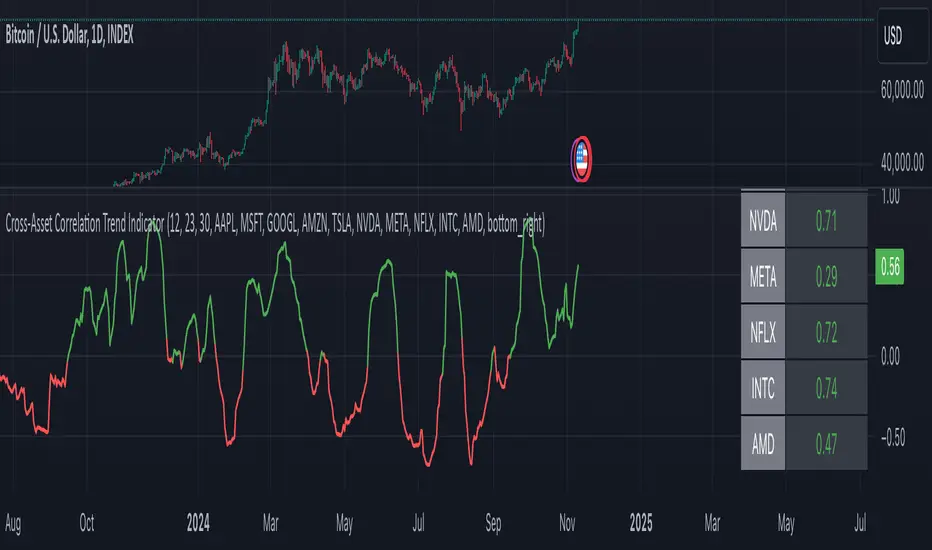
Cross-Asset Correlation Trend IndicatorCross-Asset Correlation Trend Indicator
This indicator uses correlations between the charted asset and ten others to calculate an overall trend prediction. Each ticker is configurable, and by analyzing the trend of each asset, the indicator predicts an average trend for the main asset on the chart. The strength of each asset's trend is weighted by its correlation to the charted asset, resulting in a single average trend signal. This can be a rather robust and effective signal, though it is often slow.
Functionality Overview :
The Cross-Asset Correlation Trend Indicator calculates the average trend of a charted asset based on the correlation and trend of up to ten other assets. Each asset is assigned a trend signal using a simple EMA crossover method (two customizable EMAs). If the shorter EMA crosses above the longer one, the asset trend is marked as positive; if it crosses below, the trend is negative. Each trend is then weighted by the correlation coefficient between that asset’s closing price and the charted asset’s closing price. The final output is an average weighted trend signal, which combines each trend with its respective correlation weight.
Input Parameters :
EMA 1 Length : Sets the period of the shorter EMA used to determine trends.
EMA 2 Length : Sets the period of the longer EMA used to determine trends.
Correlation Length : Defines the lookback period used for calculating the correlation between the charted asset and each of the other selected assets.
Asset Tickers : Each of the ten tickers is configurable, allowing you to set specific assets to analyze correlations with the charted asset.
Show Trend Table : Toggle to show or hide a table with each asset’s weighted trend. The table displays green, red, or white text for each weighted trend, indicating positive, negative, or neutral trends, respectively.
Table Position : Choose the position of the trend table on the chart.
Recommended Use :
As always, it’s essential to backtest the indicator thoroughly on your chosen asset and timeframe to ensure it aligns with your strategy. Feel free to modify the input parameters as needed—while the defaults work well for me, they may need adjustment to better suit your assets, timeframes, and trading style.
As always, I wish you the best of luck and immense fortune as you develop your systems. May this indicator help you make well-informed, profitable decisions!
Pine Script® indicator
Custom Supertrend Multi-Timeframe Indicator [Pineify]Supertrend Multi-Timeframe Indicator
Introduction
The Supertrend Multi-Timeframe Indicator is an advanced trading tool designed to help traders identify trend directions and potential buy/sell signals by combining Supertrend indicators from multiple timeframes. This script is original in its approach to integrating Supertrend calculations across different timeframes, providing a more comprehensive view of market trends.
Concepts and Calculations
The indicator utilizes the Supertrend algorithm, which is based on the Average True Range (ATR). The Supertrend is a popular tool for trend-following strategies, and this script enhances its capabilities by incorporating data from a larger timeframe.
Supertrend Factor: Determines the sensitivity of the Supertrend line.
ATR Length: Defines the period for calculating the Average True Range.
Larger Supertrend Factor and ATR Length: Applied to the larger timeframe for a broader trend perspective.
Larger Timeframe: The higher timeframe from which the secondary Supertrend data is sourced.
How It Works
The script calculates the Supertrend for the current timeframe using the specified factor and ATR length.
Simultaneously, it requests Supertrend data from a larger timeframe.
Buy and sell signals are generated based on crossovers and crossunders of the Supertrend lines from both timeframes.
Visual cues (up and down arrows) are plotted on the chart to indicate buy and sell signals.
Background colors change to reflect the trend direction: green for an uptrend and red for a downtrend.
Usage
Add the indicator to your TradingView chart.
Customize the Supertrend factors, ATR lengths, and larger timeframe according to your trading strategy.
Enable or disable buy and sell alerts as needed.
Monitor the chart for visual signals and background color changes to make informed trading decisions.
Note: The indicator is best used in conjunction with other technical analysis tools and should not be relied upon as the sole basis for trading decisions.
Conclusion
The Supertrend Multi-Timeframe Indicator offers a unique and powerful way to analyze market trends by leveraging the strengths of the Supertrend algorithm across multiple timeframes. Its customizable settings and clear visual signals make it a valuable addition to any trader's toolkit.
Pine Script® indicator
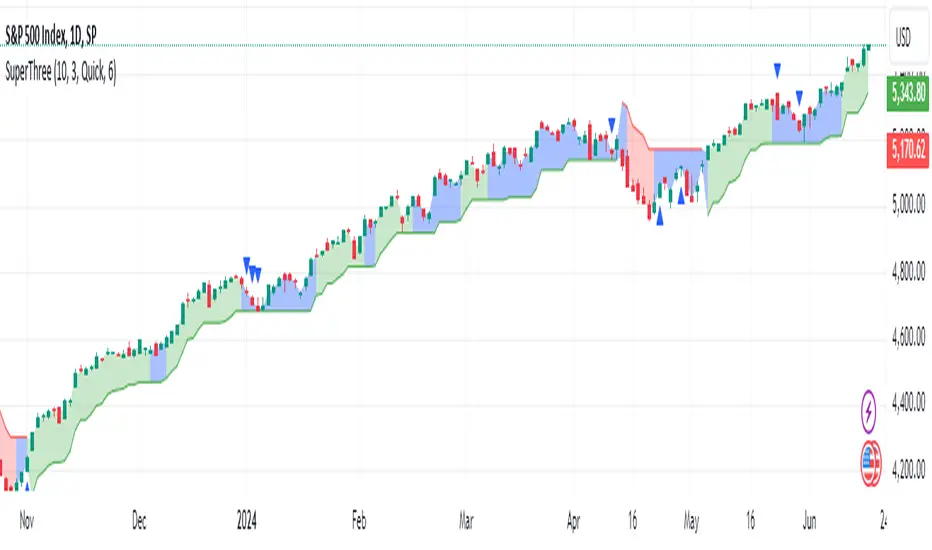
SuperThreeThe SuperThree is a comprehensive technical indicator designed to identify and visualize market trends and counter-trend momentum in trading. It uses a unique color-coding system to represent different market conditions and potential trading opportunities.
Uptrend (Green Fill) : This is indicated by a green fill. An uptrend is a period where prices are increasing overall, suggesting a strong market. It’s an ideal time for traders to consider entering long positions or exiting short positions.
Downtrend (Red Fill) : This is represented by a red fill. A downtrend is a period where prices are decreasing overall, indicating a bearish market. Traders might consider entering short positions or exiting long positions during this phase.
Sideways Trend (Blue Fill) : This is shown by a blue fill. A sideways trend, also known as a horizontal trend, is when the price is relatively stable and not making significant upward or downward movements. It’s often a period of consolidation before the price moves up or down.
Counter-Trend Momentum (Blue Arrows) : Blue arrows indicate counter-trend momentum, which can be a signal to exit trades or look for potential trend reversals. These are crucial points where the market’s momentum is shifting and may be about to move in the opposite direction.
The SuperThree indicator is an enhancement of the Supertrend indicator, providing additional features and visual cues to help traders make informed decisions. However, like all indicators, it should be used in conjunction with other forms of analysis to confirm signals and avoid potential false positives. Always consider your risk tolerance and investment goals before making trading decisions.
Happy trading! 😊
Pine Script® indicator
Easy RSI Trend - The trend is your friend till the endThis indicator detects the trend for you and keeps you out of choppy markets. It does not give you a signal, rather it tells you for what kind of signals to look for on the top right of the screen: "Only Longs" or "Only Shorts"
If there is no trend or if a trend is overextended (overbought, oversold) it tells you: "No trade allowed"
The indicator does this by scanning the 4h and daily RSI. Both are displayed in a small table in the bottom right of the screen. The upper cell is the 4h RSI and the other the daily RSI value.
AGAIN: This indicator does not give you a signal. It only tells you the direction in which you should trade. It should be used with an indicator or a strategy that gives you a clear signal.
Pine Script® indicator
Linear RegressionThis indicator can be used to determine the direction of the current trend.
The indicator plots two different histograms based on the linear regression formula:
- The colored ones represent the direction of the short-term trend
- The gray one represents the direction of the long-term trend
In the settings, you can change the length of the short-term value, which also influences the long-term as a basis that will be multiplied
Pine Script® indicator
Trend Change DetectorThe trend change detector oscillator is a tool designed to help traders identify the current trend direction paired with the potential reversal zones.
The oscillator is made of multiple parts:
- The colored histogram, that displays the current long-term trend direction (long if above 0, short if below)
- The trend line, which shows the price in relation to the fair value of the current trend
- The reversal zones, which are the area that alarms the traders that the price might reverse soon after having touched them
The indicator can work with three different inputs. In the Source panel, you can choose between "Price", "Price and Volume" and "Ponderated Volume". The price input uses only the price, the price and volume use the average between the price and the ponderated volume, and the ponderated volume shows the indicator working with volume data, with formulas such as the On Balance Volume and the Accumulation-Distribution line.
This indicator can be used both for trend following technique, using the cross of the trend line with the 0-line as signals in conjunction with the bias given by the histogram, and for mean reversal technique thanks to the reversal zones that allow traders to identify potential tops and bottoms.
Pine Script® indicator
Normalized Adaptive Trend Lines [MAMA and FAMA]These indicators was originally developed by John F. Ehlers (Stocks & Commodities V. 19:10: MESA Adaptive Moving Averages). Everget wrote the initial functions for these in pine script. I have simply normalized the indicators and chosen to use the Laplace transformation instead of the hilbert transformation
How the Indicator Works:
The indicator employs a series of complex calculations, but we'll break it down into key steps to understand its functionality:
LaplaceTransform: Calculates the Laplace distribution for the given src input. The Laplace distribution is a continuous probability distribution, also known as the double exponential distribution. I use this because of the assymetrical return profile
MESA Period: The indicator calculates a MESA period, which represents the dominant cycle length in the price data. This period is continuously adjusted to adapt to market changes.
InPhase and Quadrature Components: The InPhase and Quadrature components are derived from the Hilbert Transform output. These components represent different aspects of the price's cyclical behavior.
Homodyne Discriminator: The Homodyne Discriminator is a phase-sensitive technique used to determine the phase and amplitude of a signal. It helps in detecting trend changes.
Alpha Calculation: Alpha represents the adaptive factor that adjusts the sensitivity of the indicator. It is based on the MESA period and the phase of the InPhase component. Alpha helps in dynamically adjusting the indicator's responsiveness to changes in market conditions.
MAMA and FAMA Calculation: The MAMA and FAMA values are calculated using the adaptive factor (alpha) and the input price data. These values are essentially adaptive moving averages that aim to capture the current trend more effectively than traditional moving averages.
But Omar, why would anyone want to use this?
The MAMA and FAMA lines offer benefits:
The indicator offers a distinct advantage over conventional moving averages due to its adaptive nature, which allows it to adjust to changing market conditions. This adaptability ensures that investors can stay on the right side of the trend, as the indicator becomes more responsive during trending periods and less sensitive in choppy or sideways markets.
One of the key strengths of this indicator lies in its ability to identify trends effectively by combining the MESA and MAMA techniques. By doing so, it efficiently filters out market noise, making it highly valuable for trend-following strategies. Investors can rely on this feature to gain clearer insights into the prevailing trends and make well-informed trading decisions.
This indicator is primarily suppoest to be used on the big timeframes to see which trend is prevailing, however I am not against someone using it on a timeframe below the 1D, just be careful if you are using this for modern portfolio theory, this is not suppoest to be a mid-term component, but rather a long term component that works well with proper use of detrended fluctuation analysis.
Dont hesitate to ask me if you have any questions
Again, I want to give credit to Everget and ChartPrime!
Pine Script® indicator
MTF SuperTrends Nexus [DarkWaveAlgo]🧾 Description:
A nexus is a connection, link, or neuronal junction where signals and information are transmitted between different elements.
The MTF SuperTrends Nexus indicator serves as a nexus between MTF SuperTrends by facilitating the visualization of up to eight multi-timeframe SuperTrends, each with its own customizable timeframe, period, factor, and coloring customization. By combining these various SuperTrends, it helps you create a comprehensive view of MTF trend dynamics and cross-timeframe confluence according to the SuperTrend indicator.
It acts as a utility/control center that brings together multiple MTF SuperTrends and allows you to visualize the interactions between them with exceptional ease-of-use and customizability, helping to provide you with valuable insights into potential trend reversals, momentum shifts, and trading opportunities.
💡 Originality and Usefulness:
While there are other multi-timeframe SuperTrend indicators available, MTF SuperTrends Nexus' semi-transparent fills create a compounding opaqueness when SuperTrends from multiple timeframes coalesce - making visual assessment of cross-timeframe confluence extremely easy. We also believe it stands above the rest with its sheer quantity and quality of settings, features, and usability.
✔️ Re-Published to Avoid Misleading Values
This script has been re-published to ensure that it does not use `request.security()` calls using lookahead_on to access future data when referencing SuperTrend calculations from other timeframes. This decreases the likelihood that the indicator will provide deceiving values. This change has been made in accordance with the PineScript documentation: "Using barmerge.lookahead_on at timeframes higher than the chart's without offsetting the `expression` argument like in `close [ ]` will introduce future leak in scripts, as the function will then return the `close` price before it is actually known in the current context" and the Publishing Rule: "Do not use `request.security()` calls using lookahead to access future data". Historical and real-time values may differ when referencing timeframes other than the chart's.
💠 Features:
8 toggleable MTF SuperTrends with customizable timeframes, periods, and factors
Compounding filled areas for easy MTF SuperTrend confluence analysis
Aesthetic and flexible coloring and color theme styling options
End-of chart labels and options for ease-of-use and legibility
⚙️ Settings:
Use a Color Theme: When this setting is enabled, all manual 'Bullish and Bearish Colors' are overridden. All plots will use the colors from your selected Color Theme - excepting those plots set to use the 'Single Color' coloring method.
Color Theme: When 'Use a Color Theme' is enabled, this setting allows you to select the color theme you wish to use.
Fill SuperTrend Areas: When enabled, the area between any MTF SuperTrend and the price bars will be filled with semi-transparent coloring.
Hide SuperTrends on Timeframes Lower Than the Chart: When this setting is enabled, any MTF SuperTrend with a timeframe smaller than that of the chart the indicator is applied to will be hidden from view.
Enable: Show/hide a specific MTF SuperTrend.
Timeframe: Set the timeframe for a specific MTF SuperTrend.
Period: Set the lookback period for a specific MTF SuperTrend.
Factor: Set the multiplier factor used for a specific MTF SuperTrend's calculation.
Bullish Color: When 'Use a Color Theme' is disabled, this will set the 'bullish color' for this specific MTF SuperTrend.
Bearish Color: When 'Use a Color Theme' is disabled, this will set the 'bearish color' for this specific MTF SuperTrend.
Enable Label: When enabled, a label will show at the end of the chart displaying the timeframe, period, factor, and current price value of this specific MTF SuperTrend.
Size: Sets the font size of this specific MTF SuperTrend's label.
Label Offset (in Bars): Sets the distance from the latest bar, in bars, at which this specific MTF SuperTrend's label is displayed.
Show Label Line: When enabled, this specific MTF SuperTrend's label will be accommodated by a dashed line connecting it to its plot.
📈 Chart:
The chart shown in this original publication displays the 5 minute chart on BTCUSDT. Displayed on the chart are 6 MTF SuperTrends: the 5m 50-period/3-factor SuperTrend, 15m 50-period/3-factor SuperTrend, 30m 50-period/3-factor SuperTrend, 1h 50-period/3-factor SuperTrend, 4h 50-period/3-factor SuperTrend, and the 1D 25-period/1.5-factor SuperTrend - offering an exemplary view of how you can easily use these MTF SuperTrends to your advantage in analyzing SuperTrend relationships across multiple timeframes.
Pine Script® indicator
Trendline Pivots [QuantVue]Trendline Pivots
The Trend Line Pivot Indicator works by automatically drawing and recognizing downward trendlines originating from and connecting pivot highs or upward trendlines originating from and connecting pivot lows.
These trendlines serve as reference points of potential resistance and support within the market.
Once identified, the trend line will continue to be drawn and progress with price until one of two conditions is met: either the price closes(default setting) above or below the trend line, or the line reaches a user-defined maximum length.
If the price closes(default setting) above a down trend line or below an up trend line, an "x" is displayed, indicating the resistance or support has been broken. At the same time, the trend line transforms into a dashed format, enabling clear differentiation from active non-breached trend lines.
This indicator is fully customizable from line colors, pivot length, the number lines you wish to see on your chart and works on any time frame and any market.
Don't hesitate to reach out with any questions or concerns.
We hope you enjoy!
Cheers.
Pine Script® indicator
Normalized KAMA Oscillator | Ikke OmarThis indicator demonstrates the creation of a normalized KAMA (Kaufman Adaptive Moving Average) oscillator with a table display. I will explain how the code works, providing a step-by-step breakdown. This is personally made by me:)
Input Parameters:
fast_period and slow_period: Define the periods for calculating the KAMA.
er_period: Specifies the period for calculating the Efficiency Ratio.
norm_period: Determines the lookback period for normalizing the oscillator.
Efficiency Ratio (ER) Calculation:
Measures the efficiency of price changes over a specified period.
Calculated as the ratio of the absolute price change to the total price volatility.
Smoothing Constant Calculation:
Determines the smoothing constant (sc) based on the Efficiency Ratio (ER) and the fast and slow periods.
The formula accounts for the different periods to calculate an appropriate smoothing factor.
KAMA Calculation:
Uses the Exponential Moving Average (EMA) and the smoothing constant to compute the KAMA.
Combines the fast EMA and the adjusted price change to adapt to market conditions.
Oscillator Normalization:
Normalizes the oscillator values to a range between -0.5 and 0.5 for better visualization and comparison.
Determines the highest and lowest values of the KAMA within the specified normalization period.
Transforms the KAMA values into a normalized range.
By incorporating the Efficiency Ratio, smoothing constant, and normalization techniques, the indicator actually allows for the identification of trends on different timeframes, even in extreme market conditions.
The normalization makes it much more adaptive than if you were to just use a normal KAMA line. This way you actually get a lot more data by looking at the histogram, rather than just the KAMA line.
I essentially made the KAMA into an oscillator! Please ask if you want me to code another indicator
I hope you enjoyed this.
Please ask if you have any questions<3
Pine Script® indicator
Another New Adaptive Moving Average [CC]The New Adaptive Moving Average was created by Scott Cong (Stocks and Commodities Mar 2023) and this is a companion indicator to my previous script . This indicator still works off of the same concept as before with effort vs results but this indicator takes a slightly different approach and instead defines results as the absolute difference between the closing price and a closing price x bars ago. As you can see in my chart example, this indicator works great to stay with the current trend and provides either a stop loss or take profit target depending on which direction you are going in. As always, I use darker colors to show stronger signals and lighter colors to show normal signals. Buy when the line turns green and sell when it turns red.
Let me know if there are any other indicator scripts you would like to see me publish!
Pine Script® indicator