Smart Trader, Episode 06, Isotropic Trend Lines🔷 WHAT IS ST-EP06 — ISOTROPIC TREND LINES?
ST-EP06 is a multi-scale structural trend channel indicator built on a σ-normalized coordinate system. It is designed to solve one of the oldest unaddressed problems in technical analysis:
trend angles that cannot be compared across instruments, timeframes, or volatility regimes.
A trend line drawn on a chart appears to carry a measurable angle — yet that angle is an artifact of the display window, not a property of the market. Resize the chart horizontally and the slope flattens; compress it and the slope steepens. A given price movement on Gold daily and Bitcoin 1-hour may produce visually identical slopes on screen while reflecting entirely different structural conditions. This happens because traditional charts use a coordinate space where the vertical axis (price) and the horizontal axis (time) share no fixed dimensional relationship.
The consequence is not merely cosmetic. A trader cannot meaningfully compare the steepness of a trend on one instrument with another — or even across timeframes on the same instrument — because the weight of "one unit of price per bar" varies with the instrument's current volatility.
As the author of this indicator, I sought a coordinate system where trend angles would be an intrinsic structural property of the market, independent of charting software or display settings. The goal: a space where a 30° uptrend on EUR/USD weekly carries the same structural meaning as a 30° uptrend on NASDAQ 5-minute — indicating that each market is moving at the same rate relative to its own realized volatility.
The solution draws on the principle of dimensional analysis, well established in physics and engineering. Just as the Reynolds number normalizes fluid flow to make behavior comparable across different pipe sizes and fluid viscosities, this indicator normalizes price movement by realized volatility, producing a dimensionless space we call the Isotropic Coordinate System (ICS).
In ICS, price is expressed in natural logarithmic form and scaled by a volatility estimate (σ) derived from the Yang-Zhang (2000) method — a drift-invariant estimator that incorporates Open, High, Low, and Close data. The resulting vertical axis is dimensionless: one unit equals one standard deviation of recent realized price behavior. When trend angles are measured in this space, 45° indicates approximately one σ of movement per bar — whether the chart shows a penny stock, a major currency pair, or a commodity index.
Traditional chart coordinates assign no fixed relationship between the price axis and the time axis. Resizing the chart window changes the visual slope of the same price movement — a compressed view may show 52° while a stretched view of the same data shows 25°. The angle is a display artifact, not a market property. The Isotropic Coordinate System (ICS) addresses this by normalizing log-price by realized volatility (σ). In this space, the trend angle is designed to remain constant regardless of how the chart is displayed — because it measures price displacement in units of σ per bar, not in pixels per pixel.
🔷 HOW THE MODULES WORK TOGETHER
ST-EP06 operates as a deterministic pipeline where each stage consumes the output of the one before it:
Realized volatility estimation (σ) → Structural block construction → Monotonic direction detection → ICS angle measurement → Channel boundary fitting → Six-scale parallel analysis → Consensus aggregation → Breakout and retest state tracking → Dashboard narrative generation
The Yang-Zhang σ provides the normalization constant for every downstream computation. Price history is then partitioned into structural blocks, each distilled to a single central tendency that resists close-price bias. Consecutive block centers are compared to identify the longest uninterrupted directional segment. The slope of that segment, measured in σ-normalized space, yields the ICS angle. Four price extremes located within the segment define two log-linear channel boundaries. This complete pipeline runs independently at six temporal scales, and their independent outputs are aggregated into a structural consensus. A finite-state machine then tracks the evolving relationship between price and the primary channel — breakout, retest, confirmation, or failure — and translates it into a single-line human-readable narrative.
ST-EP06 operates as a deterministic sequential pipeline. Yang-Zhang volatility (σ) provides the normalization constant that flows into every downstream stage. Price history is partitioned into structural blocks, each reduced to a geometric mean. The longest monotonic segment determines direction, and its slope in σ-normalized space yields the ICS angle. Four price extremes define the channel boundaries. This complete pipeline runs independently at six scales — 3, 7, 13, 19, 29, and 47 bars per block — all prime numbers, chosen to minimize harmonic overlap so that multiple scales are unlikely to lock onto the same cyclical artifact. Scale 19 (highlighted) serves as the primary engine: it is the only scale that maps to the user's Trend Block Period input, and the only scale whose output drives the chart-overlay channel lines, the projection, the diamond markers, and the breakout/retest state machine. The other five scales operate at fixed periods and contribute exclusively to the cross-scale consensus count — providing structural context that a single scale cannot offer alone. When 5 or 6 of the 6 scales agree on direction, it suggests a structural trend visible across a broad range of temporal resolutions.
🔷 DATA ANCHORING
Every structural computation in ST-EP06 — volatility, block means, direction, channel coordinates, state machine transitions, and dashboard narrative — is governed by a single anchoring reference, selected through the Calculation Bar input.
Live Bar mode (default): the anchor is the current forming bar. Values update with each incoming tick. This is standard TradingView behavior and means the indicator may exhibit intra-bar repaint — the live bar's data enters all computations as it evolves.
Close Bar mode: the anchor shifts to the last fully confirmed (closed) bar. The forming bar is excluded from every computation. Values lock once a bar closes and do not change retroactively. This mode is intended for structural analysis, back-testing, and any workflow where historical consistency is a priority.
One deliberate exception is maintained in both modes: the dashboard header always displays the current live closing price (Live Exception protocol), preserving real-time price awareness regardless of how the indicator's structural engine is anchored.
Two modes, same chart moment. In Live Bar the anchor sits on the forming bar, so every value updates tick-by-tick and may repaint within the bar. In Close Bar the anchor shifts to the last closed bar, locking all structural values once the bar closes. The only exception is the dashboard header row, which always displays the live closing price in both modes, so real-time price awareness is never lost.
🔷 YANG-ZHANG VOLATILITY (σ)
The foundation of the ICS is a robust volatility estimate. ST-EP06 uses the Yang-Zhang (2000) realized volatility estimator, an academically established method that combines three variance components:
Overnight variance — capturing the gap between consecutive sessions, measured from the prior close to the current open.
Intraday variance — capturing the movement from open to close within each session.
Range-based variance — using the Rogers-Satchell (1991) estimator, which extracts additional information from the high and low prices without assuming zero drift.
These three components are blended using an optimal weight that is designed to minimize estimation error. The resulting σ updates every bar, adapts to changing market conditions, and — crucially — is drift-invariant: it is intended to remain unbiased whether the market is trending strongly or mean-reverting.
🔷 BLOCK CONSTRUCTION
Rather than analyzing individual bars, ST-EP06 partitions recent price history into consecutive non-overlapping blocks. Each block spans a user-defined number of bars (the Trend Block Period input) and is reduced to a single representative value: the geometric mean of the block's highest high and lowest low, computed in logarithmic space.
This log-midpoint serves as the block's central tendency. Unlike a simple average of closing prices, it captures the structural center of the entire price range within the block, avoiding bias toward any single price point. The number of consecutive blocks compared is controlled by the Trend Block Groups input — more groups means deeper lookback and the ability to detect longer structural trends.
Price history is partitioned into consecutive non-overlapping blocks. Each block reduces to a single log-midpoint — the geometric mean of its highest high and lowest low. Connecting the midpoints forms the representative chain used for trend detection.
🔷 DIRECTION DETECTION + ICS ANGLE
Once blocks are constructed, the engine compares their geometric means in sequence, starting from the most recent. It identifies the longest consecutive segment where each block's central tendency moves in the same direction — either consistently rising or consistently falling. A single reversal terminates the segment.
The slope of this segment is then measured in ICS space: the logarithmic price difference between the oldest and newest blocks in the segment, divided by σ, divided by the number of bars between them. The arctangent of this normalized slope produces the ICS angle in degrees.
If the absolute angle falls within the Range Threshold (a user-configurable dead zone in degrees), the direction is classified as ranging rather than trending. This threshold acts as a sensitivity filter — wider values require steeper moves before declaring a trend, narrower values respond to subtler directional shifts.
An ICS angle of 45° indicates approximately one σ of price movement per bar. An angle near 0° suggests the market may be structurally flat. Because σ adjusts for volatility and the logarithm adjusts for price level, these angles are intended to be directly comparable across any instrument and any timeframe.
🔷 CHANNEL FITTING
Within the identified trending segment, the engine locates four price extremes: the highest high, the lowest high, the highest low, and the lowest low — each paired with its bar position. These four points define two linear boundaries in ICS space.
During an uptrend, the upper boundary is fitted through the lowest high and highest high (capturing the rising ceiling), while the lower boundary is fitted through the lowest low and highest low (capturing the rising floor). During a downtrend, the fitting order reverses to capture descending structure. During a ranging market, the channel uses horizontal boundaries at the segment's absolute high and low.
All boundary computations occur in the σ-normalized logarithmic coordinate system, meaning the channel lines represent geometric (log-linear) paths in price space — curves that naturally follow multiplicative price behavior rather than additive assumptions.
Within the trending segment, four extremes — HH, LH, HL, LL — define two log-linear boundaries. In an uptrend, the upper line fits through LH and HH, the lower through LL and HL. The direction reverses the fitting order for downtrends, and a ranging market uses horizontal boundaries.
🔷 6-SCALE PARALLEL ANALYSIS
A single temporal scale may capture the trend at one resolution but miss structure at others. ST-EP06 runs the complete pipeline — volatility normalization, block construction, direction detection, ICS angle, and channel fitting — independently at six different scales: 3, 7, 13, 19, 29, and 47 bars per block. These values were chosen as prime numbers to minimize harmonic overlap between scales.
Scale 19 serves as the primary engine and maps to the user's Trend Block Period input. The other five scales use fixed periods, providing a structural context that the primary engine alone cannot offer.
The dashboard displays each scale's independent trend direction. A consensus count shows how many of the six scales agree: 5/6 or 6/6 agreement suggests a structural trend that is visible across multiple temporal resolutions, while low agreement may indicate transitional or conflicting structure.
🔷 BREAKOUT / RETEST STATE MACHINE
ST-EP06 includes a 5-state finite automaton that tracks price's structural relationship to the primary channel boundaries:
Inside — price is observed between the channel floor and ceiling. The dashboard shows the position as a percentage: distance from floor and distance to ceiling (summing to 100%).
Breakout Up / Breakout Down — price has exited above the ceiling or below the floor. The dashboard shows the breakout price and the percentage of channel width that price has moved beyond the boundary.
Retest Up / Retest Down — after a breakout, price has moved at least one σ away from the boundary (establishing distance), then returned to test it. The dashboard shows both the original breakout price and the current retest level.
Transitions between states use dynamic σ-based thresholds rather than fixed percentages, meaning the sensitivity automatically adjusts with market volatility. Additional flags track:
✓ Confirmed — a breakout that has been retested and bounced at least one σ away from the boundary.
(gap) — price crossed the entire channel width in a single transition.
Failed breakout — price re-entered the channel after initially breaking out.
Direction reset — the primary trend direction changed, wiping all breakout state.
🔷 VISUAL TOOLS
All chart-overlay elements are drawn from the primary engine (scale 19):
Channel lines — solid upper and lower boundaries from the segment start to the anchor bar, colored by trend direction (configurable up/down/range colors, width, and line style).
Projection lines — dotted forward extension of the channel slopes beyond the anchor bar, providing a visual reference for potential future support and resistance. The projection offset, width, and style are independently configurable.
Channel fill — semi-transparent shading between channel boundaries, with independent color selection and adjustable transparency. Applies to both the solid channel and projection segments.
Diamond markers (◆) — placed at the channel endpoints on the anchor bar. Hovering reveals a tooltip with the anchored close price, ceiling level, floor level, and the price's position as a percentage of channel width.
Direction label — positioned at the midpoint between segment start and projection end. Displays the trend arrow, direction text, and ICS angle (e.g., "▲ UP +7.3°"). Tooltip includes block count.
🔷 DASHBOARD
A compact information table appears at the top-right corner of the chart, organized in 5 rows:
Header — indicator name, ticker symbol, timeframe, and live price (always live under the Live Exception protocol, even in Close Bar mode).
Period — the six scale values (3, 7, 13, user's period, 29, 47) displayed across columns. The primary engine column is highlighted.
Trend — per-scale trend direction with directional arrows (▲ UP, ▼ DN, ◈ RNG) and color coding.
Agreement — consensus count (e.g., "5/6 UP") with the primary channel ceiling (▲) and floor (▼) price levels.
Narrative — a single merged row presenting the breakout/retest state machine output as a human-readable sentence with distance measurements. This row updates dynamically as price interacts with the channel.
All dashboard text, tooltips, and narrative phrases are fully localized.
🔷 ALERT CONDITIONS
ST-EP06 provides 19 alert conditions organized in 5 categories, all gated by a master Enable Alerts toggle:
D · Direction (3 alerts) — fires when the primary engine trend changes to uptrend, downtrend, or range.
B · Breakout (4 alerts) — fires on initial breakout above ceiling or below floor, and separately on confirmed breakout (retested and bounced).
R · Retest (2 alerts) — fires when price returns to test the boundary after establishing distance.
S · Structural (5 alerts) — fires on gap-through events (price crosses entire channel), failed breakouts (price re-enters channel), and direction resets (trend change wipes state).
A · Agreement (5 alerts) — fires when cross-scale consensus reaches significant thresholds: full bullish (6/6), strong bullish (5/6), full bearish (6/6), strong bearish (5/6), or range consensus (≥4/6).
Important: alerts require Calculation Bar = Live Bar. In Close Bar mode, all alert conditions are automatically suppressed and a visual warning is displayed on the chart — because Close Bar mode intentionally lags by one bar, which is semantically incompatible with live alert delivery.
🔷 LANGUAGE SUPPORT
The dashboard, all tooltips, the breakout/retest narrative, and the alert warning label are available in 7 languages:
English · Türkçe · العربية · Русский · Italiano · Português (BR) · 中文
Select the preferred language from the Language dropdown in the Display settings group. All structural and numerical outputs remain unchanged — only the display language of text elements is affected.
🔷 HOW TO USE
Apply ST-EP06 to any chart — the indicator is designed to work across instruments (equities, forex, crypto, commodities, indices) and timeframes without parameter re-optimization, because the ICS framework normalizes for volatility and price level automatically.
Start with the default settings (Period 26, Groups 5, Sigma Length 20) and observe how the channel captures the dominant structural trend. The 6-scale consensus in the dashboard may help assess whether the observed trend is isolated to one temporal resolution or confirmed across multiple scales.
The Calculation Bar setting is a structural decision: use Live Bar for real-time monitoring and alert-driven workflows; use Close Bar for analysis and back-testing where historical stability is prioritized.
The ICS angle on the direction label provides a quantitative measure of trend intensity. Comparing angles across different instruments or timeframes is one of the intended use cases of the ICS framework — a 15° angle on one chart and a 15° angle on another may suggest similar structural momentum relative to each market's own volatility.
The breakout/retest narrative in the dashboard bottom row is designed to provide context-rich status updates without requiring manual chart reading. The σ-based thresholds ensure that breakout sensitivity adapts to current market conditions rather than relying on fixed values.
🔷 SETTINGS
Calculation — Calculation Bar (Live/Close Bar anchoring), Trend Block Period (bars per block), Trend Block Groups (consecutive blocks compared), Range Threshold (ICS dead zone in degrees), Yang-Zhang Sigma Length (volatility lookback).
Channel Lines — Up Color, Down Color, Range Color, Line Width, Line Style.
Projection Lines — Projection Offset (forward bars), Projection Width, Projection Style.
Display — Language (7 options), Show Channel (toggle overlay), Show Fill (toggle shading), Show Dashboard (toggle table), Dashboard Font Size.
Channel Fill — Fill Up Color, Fill Down Color, Fill Range Color, Fill Transparency.
Alerts — Enable Alerts (master toggle, requires Live Bar mode).
🔷 DISCLAIMER
ST-EP06 is an educational and analytical tool. It is designed to provide structural context through σ-normalized trend channels and multi-scale analysis. It does not generate buy or sell signals, does not predict future price movement, and is not intended as financial advice. Historical patterns observed through this indicator do not guarantee future outcomes. All trading decisions remain the sole responsibility of the trader.
Tradingideas
Smart Trader,Episode 1, by Ata Sabanci | Unified Matrix⚠️ **CRITICAL: READ BEFORE USING** ⚠️
This strategy is **100% VOLUME-BASED** and requires **Lower Timeframe (LTF) intrabar data** for accurate calculations. Please understand the following limitations before using:
**📊 DATA ACCURACY LEVELS:**
• **1T (Tick)** — Most accurate, real volume distribution per tick
• **1S (1 Second)** — Reasonably accurate approximation
• **15S (15 Seconds)** — Good approximation, longer historical data available
• **1M (1 Minute)** — Rough approximation, maximum historical data range
**⚠️ BACKTEST & REPLAY LIMITATIONS:**
• TradingView's Strategy Tester uses historical LTF data which may be limited depending on your subscription plan
• Replay mode results may differ from live trading due to data availability
• For longer backtest periods, use higher LTF settings (15S or 1M)
• Not all symbols/exchanges support tick-level data
• Crypto and Forex typically have better LTF data availability than stocks
**💡 A NOTE ON TOOLS:**
Successful trading requires proper tools. Higher TradingView plans provide access to more historical intrabar data, which directly impacts the accuracy of volume-based calculations. More precise volume data leads to more reliable signals. Consider this when evaluating your trading infrastructure.
**WHY "EPISODE 1"?**
This strategy is titled "Episode 1" because it focuses exclusively on **Highest Buyers (HB)** — a single but powerful concept in volume analysis.
**The Philosophy:**
A single high-volume buying event can tell us a story about market psychology:
• Where did the biggest buyers enter?
• How much of their power remains?
• Are sellers consuming their advantage?
• At what rate is the balance shifting?
By focusing on just ONE aspect of volume analysis, traders can deeply understand how a buying surge affects future price action before moving to more complex multi-factor analysis.
**The Reality:**
This script alone is approximately **2000 lines of code** — and it only analyzes buyers. A comprehensive system covering all aspects (sellers, combined analysis, multi-timeframe correlation) would be significantly larger and computationally heavier. Breaking this into focused modules allows for:
• Deeper understanding of each component
• Lighter, more responsive scripts
• Educational progression from simple to complex
**OVERVIEW**
Smart Trader EP1 is a volume-based trading strategy that tracks the balance of power between buyers and sellers through the lens of the **Highest Buyers event**. Unlike traditional indicators that rely on price patterns or mathematical formulas, this strategy analyzes *actual volume flow* to identify who is in control of the market.
The core philosophy is simple: **markets move when one side (buyers or sellers) exhausts their power while the opposing side accumulates strength.** By measuring this power shift in real-time, the strategy identifies high-probability entry and exit points.
**HOW IT WORKS**
**1. Volume Engine**
The strategy splits each candle's volume into buying volume and selling volume using intrabar data. In *Intrabar (Precise)* mode, it uses actual tick-by-tick or second-by-second data to calculate the exact buy/sell distribution. In *Geometry* mode, it approximates based on candle structure (close position within the range).
**2. Event Detection**
Within the lookback window, the strategy identifies key events:
• **HB (Highest Buyers)** — The candle with maximum buying volume (potential resistance when exhausted)
• **HS (Highest Sellers)** — The candle with maximum selling volume (potential support when exhausted)
• **LB (Lowest Buyers)** — The candle with minimum buying volume (buyer absence)
• **LS (Lowest Sellers)** — The candle with minimum selling volume (seller absence)
These events create dynamic support and resistance levels based on actual volume, not arbitrary price levels.
**3. Power Tracking (Attrition Model)**
For the Highest Buyers event (HB), the strategy tracks:
• **Start Power (X)** — The initial buying volume at the HB event
• **Consumed Power (Y)** — How much selling volume has accumulated since the event
• **Remaining Power (Z)** — Start Power minus Consumed Power (X - Y)
• **Opponent Dominance** — When Remaining Power goes negative (Z < 0), sellers have overtaken buyers
Think of it like a battle: buyers establish a position (HB), and sellers gradually consume their power. When buyers' power is exhausted (Remaining Power ≤ 0), sellers have taken control.
**4. Depletion Markers**
Visual markers appear on the chart when power reaches critical thresholds:
• **🔋** — Buyers consumed 100% (Remaining = 0)
• **🚨** — Buyers consumed 200% (Opponent Dominance = 100%)
• **🪫** — Sellers consumed 100%
• **⚠️** — Sellers consumed 200%
**5. Cumulative Delta**
Beyond tracking power at specific events, the strategy calculates the cumulative buy volume minus sell volume since the HB event. This shows the *net flow* of money:
• **Positive Delta** — More buying than selling since HB (bullish pressure)
• **Negative Delta** — More selling than buying since HB (bearish pressure)
**6. Trend Channel**
A 5-point linear regression channel identifies the current trend:
• **UPTREND** — Both upper and lower channel lines slope upward
• **DOWNTREND** — Both lines slope downward
• **RANGING** — Mixed or flat slopes
The strategy also tracks where the HB event occurred within this channel (TOP, UPPER, MIDDLE, LOWER, BOTTOM) to contextualize the signal.
**7. Nearest Event Analysis**
The strategy identifies which event is closest to the current candle and analyzes the price action *after* that event:
• How many bullish vs bearish candles followed?
• Does post-event momentum confirm or contradict the event type?
This prevents false signals when, for example, a bearish event occurs but is immediately followed by strong bullish candles.
**SIGNAL LOGIC**
**🟢 LONG Signal Conditions:**
• Uptrend with positive cumulative delta and buyers accumulating
• At channel bottom/lower with strong buyer power remaining
• After a bearish event (HS) with bullish post-event momentum (reversal signal)
• Ranging market with positive delta and strong power
**🔴 SHORT Signal Conditions:**
• Downtrend with negative cumulative delta and sellers in control
• Opponent Dominance (buyer power exhausted) with bearish momentum
• Buyer Trap: HB at TOP in uptrend but power exhausted and delta negative
• After a bullish event (HB) with bearish post-event momentum (trap signal)
**⏳ NO_TRADE Conditions:**
• Conflicting signals (e.g., bearish event but bullish post-momentum)
• Ranging market without clear direction
• Mixed power readings
• Price position contradicts signal direction
**STRATEGY EXECUTION**
**Entry Rules:**
• Enter LONG when signal is "LONG" and conditions are valid
• Enter SHORT when signal is "SHORT" and conditions are valid
• **Pyramid**: Up to 2 entries allowed in the same direction (configurable)
• Each entry uses 10% of equity by default
• Only one entry per confirmed candle (prevents multiple fills)
**Stop Loss (Event Line Based):**
• **LONG positions**: Stop Loss placed below the HS line (seller support level)
• **SHORT positions**: Stop Loss placed above the HB line (buyer resistance level)
• A small buffer percentage is added to prevent premature stops
**Take Profit (Event Line Based):**
• **LONG positions**: Take Profit near the HB line (buyer resistance target)
• **SHORT positions**: Take Profit near the HS line (seller support target)
• A small buffer percentage ensures realistic fill expectations
**Exit Rules:**
• Exit LONG when signal changes to SHORT
• Exit SHORT when signal changes to LONG
• **NO_TRADE signal = HOLD** (do not exit, wait for clear direction)
• SL/TP orders remain active regardless of signal changes
**SETTINGS GUIDE**
**⚙️ General Settings:**
• *Calculation Method* — Choose between Intrabar (Precise) or Geometry (approximation)
• *Intrabar Resolution* — LTF for volume data (1T, 1S, 15S, 1M)
• *Lookback Length* — Window for scanning events (10-150 bars)
• *Timezone Offset* — Adjust clock display to your local time
**📊 Matrix Display Settings:**
• *Show Unified Matrix* — Toggle the information dashboard
• *Show Event Lines* — Toggle horizontal lines at event prices
• *Panel Size/Position* — Customize dashboard appearance
• *Projection Bars* — Extend event lines into the future
• *Depletion Threshold* — Percentage for depletion markers (default: 100%)
**🏷️ Rank Labels Settings:**
• *Show Rank Labels (HB/HS)* — Display labels on highest volume candles
• *Show Low Labels (LB/LS)* — Display labels on lowest volume candles
• *Ranks Count* — Number of rankings to display (1-5)
**📐 Trend Channel Settings:**
• *Show Trend Channel* — Toggle the 5-point regression channel
• *Line Color/Fill/Width/Style* — Customize channel appearance
**🎯 Trade Signal Settings:**
• *Long: Min Remaining Power %* — Minimum buyer power for LONG signal (default: 50%)
• *Short: Max Remaining Power %* — Maximum power for SHORT signal (default: 30%)
• *Opponent Dominance Threshold* — When to consider power "exhausted" (default: 0%)
• *Max Decay Angle* — Maximum consumption rate for valid entries (default: 60°)
**📈 Strategy Execution Settings:**
• *Enable Strategy* — Turn automatic trading on/off
• *Allow LONG/SHORT* — Enable or disable specific directions
• *Max Pyramid Entries* — Maximum entries in same direction (1-3)
• *SL Buffer %* — Distance below/above event line for stop loss (default: 0.15%)
• *TP Buffer %* — Distance from event line for take profit (default: 0.05%)
**VISUAL ELEMENTS**
**Chart Labels:**
• **#1 HB** — Highest Buyers (rank label on candle high)
• **#1 HS** — Highest Sellers (rank label on candle low)
• **#1 LB** — Lowest Buyers (rank label on candle high)
• **#1 LS** — Lowest Sellers (rank label on candle low)
• **🔋 / 🚨** — Buyer power depletion markers
• **🪫 / ⚠️** — Seller power depletion markers
**Event Lines:**
• **Blue horizontal lines** — HB price levels (buyer entry points)
• **Red horizontal lines** — HS price levels (seller entry points)
• **Cyan lines** — LB price levels
• **Orange lines** — LS price levels
• **Dashed extensions** — Projected levels into future bars
**Trend Channel:**
• **Orange lines** — Upper and lower channel boundaries (5-point regression)
• **Orange fill** — Channel area (90% transparency)
**Matrix Dashboard (6 rows):**
• Row 1: Header with symbol, LTF setting, and local clock
• Row 2: Volume snapshot (Total, Buy, Sell, Delta)
• Row 3: Column headers
• Row 4: Highest Buyers data (Age, Start Power, Consumed, Remaining, Decay, ETA)
• Row 5: Highest Sellers data
• Row 6: Signal Evaluation (Trend, Zone, Nearest Event, Signal, Reason)
**Strategy Markers:**
• **Green triangle up** — LONG entry
• **Red triangle down** — SHORT entry
• **Faded triangles** — Pyramid entries
• **Colored lines** — SL (red) and TP (green) levels when in position
**BEST PRACTICES**
**For Maximum Accuracy:**
1. Use **1T (tick)** or **1S** intrabar resolution when available
2. Trade liquid markets with good volume data (crypto majors, forex majors, high-volume stocks)
3. Use smaller lookback length (20-30) to ensure all bars have valid LTF data
4. Monitor the "Intrabar Valid Bars" counter in the matrix header
5. If you see data warnings, reduce lookback or increase LTF resolution
**For Longer Backtests:**
1. Use **15S or 1M** intrabar resolution for more historical data
2. Increase lookback length if needed
3. Understand that accuracy decreases with higher LTF settings
4. Consider using Geometry mode for very long backtests (approximation but always available)
**Understanding the Signals:**
• Pay attention to the signal *reasoning* shown in the matrix — it explains WHY
• **NO_TRADE** means the system sees conflicting factors — respect this caution
• Event lines act as dynamic S/R — they update as new volume events occur
• Cumulative Delta (Δ) often provides early warning of trend changes
**Risk Management:**
• The default 10% per entry with max 2 pyramids = 20% maximum exposure
• Event-line-based SL/TP provides logical levels based on actual volume events
• Always verify signals with your own analysis before trading
**INTERPRETING THE MATRIX**
**Power Status Examples:**
• *Remaining Power: 75%* — Buyers still have most of their strength
• *Remaining Power: 25%* — Buyers nearly exhausted, watch for reversal
• *Opponent Dominance: -50%* — Sellers have consumed 150% of buyer power (strong bearish)
**Decay Angle:**
• *Low angle (0-30°)* — Slow consumption, power lasting longer
• *High angle (60-90°)* — Rapid consumption, expect quick exhaustion
**ETA to Parity:**
• Shows estimated bars until Remaining Power reaches zero
• *"Overtaken"* with 🚨 means sellers have already dominated
**LIMITATIONS & DISCLAIMER**
**Technical Limitations:**
• Requires sufficient historical LTF data (varies by TradingView plan and symbol)
• Intrabar (Precise) mode may show invalid data warnings on symbols with limited history
• Strategy tester may not have access to the same LTF data as live trading
• Maximum 500 lines and 500 labels (TradingView platform limits)
**Important Notes:**
• This strategy focuses on **Highest Buyers only** — it does not analyze all market factors
• Past performance does not guarantee future results
• Volume data quality varies significantly between symbols and exchanges
• The strategy's signals are analytical tools, not trading recommendations
**Risk Disclaimer:**
This strategy is provided for **educational and informational purposes only**. Trading involves substantial risk of loss and is not suitable for all investors.
• Always use proper risk management
• Never risk more than you can afford to lose
• Backtest results may differ significantly from live trading
• You are solely responsible for your trading decisions
**TECHNICAL SPECIFICATIONS**
• Pine Script Version: 6
• Calculation: calc_on_every_tick=true, use_bar_magnifier=true
• Default Capital: 10,000
• Default Position Size: 10% of equity
• Maximum Lines: 500
• Maximum Labels: 500
• External Library: TradingView/ta/10 (for requestUpAndDownVolume)
*Smart Trader EP1 — Understanding Volume, One Event at a Time*
Pine Script® strategy
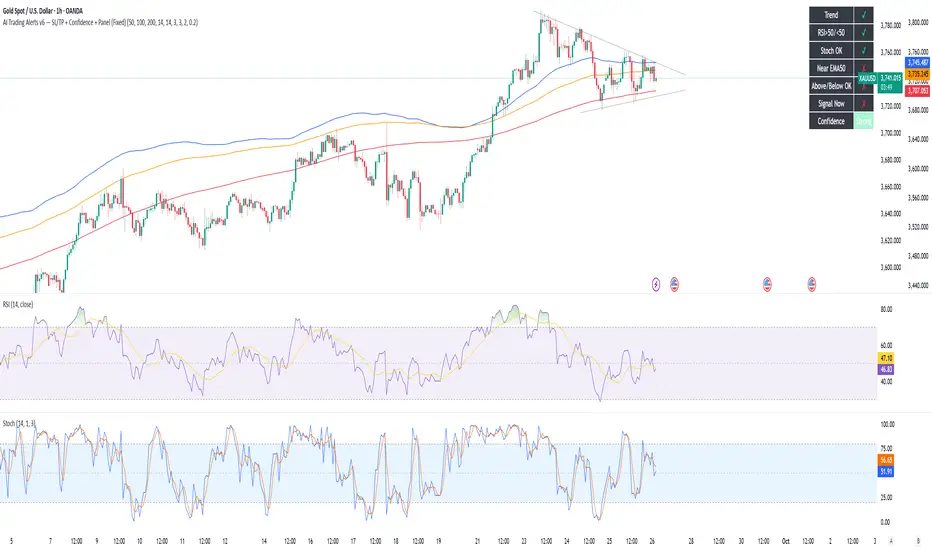
AI Trading Alerts v6 — SL/TP + Confidence + Panel (Fixed)Overview
This Pine Script is designed to identify high-probability trading opportunities in Forex, commodities, and crypto markets. It combines EMA trend filters, RSI, and Stochastic RSI, with automatic stop-loss (SL) & take-profit (TP) suggestions, and provides a confidence panel to quickly assess the trade setup strength.
It also includes TradingView alert conditions so you can set up notifications for Long/Short setups and EMA crosses.
⚙️ Features
EMA Trend Filter
Uses EMA 50, 100, 200 for trend confirmation.
Bull trend = EMA50 > EMA100 > EMA200
Bear trend = EMA50 < EMA100 < EMA200
RSI Filter
Bullish trades require RSI > 50
Bearish trades require RSI < 50
Stochastic RSI Filter
Prevents entries during overbought/oversold extremes.
Bullish entry only if %K and %D < 80
Bearish entry only if %K and %D > 20
EMA Proximity Check
Price must be near EMA50 (within ATR × adjustable multiplier).
Signals
Continuation Signals:
Long if all bullish conditions align.
Short if all bearish conditions align.
Cross Events:
Long Cross when price crosses above EMA50 in bull trend.
Short Cross when price crosses below EMA50 in bear trend.
Automatic SL/TP Suggestions
SL size adjusts depending on asset:
Gold/Silver (XAU/XAG): 5 pts
Bitcoin/Ethereum: 100 pts
FX pairs (default): 20 pts
TP = SL × Risk:Reward ratio (default 1:2).
Confidence Score (0–4)
Based on conditions met (trend, RSI, Stoch, EMA proximity).
Labels:
Strongest (4/4)
Strong (3/4)
Medium (2/4)
Low (1/4)
Visual Panel on Chart
Shows ✅/❌ for each condition (trend, RSI, Stoch, EMA proximity, signal now).
Confidence row with color-coded strength.
Alerts
Long Setup
Short Setup
Long Cross
Short Cross
🖥️ How to Use
1. Add the Script
Open TradingView → Pine Editor.
Paste the full script.
Click Add to chart.
Save as "AI Trading Alerts v6 — SL/TP + Confidence + Panel".
2. Configure Inputs
EMA Lengths: Default 50/100/200 (works well for swing trading).
RSI Length: 14 (standard).
Stochastic Length/K/D: Default 14/3/3.
Risk:Reward Ratio: Default 2.0 (can change to 1.5, 3.0, etc.).
EMA Proximity Threshold: Default 0.20 × ATR (adjust to be stricter/looser).
3. Read the Panel
Top-right of chart, you’ll see ✅ or ❌ for:
Trend → Are EMAs aligned?
RSI → Above 50 (bull) or below 50 (bear)?
Stoch OK → Not extreme?
Near EMA50 → Close enough to EMA50?
Above/Below OK → Price position vs. EMA50 matches trend?
Signal Now → Entry triggered?
Confidence row:
🟢 Green = Strongest
🟩 Light green = Strong
🟧 Orange = Medium
🟨 Yellow = Low
⬜ Gray = None
4. Alerts Setup
Go to TradingView Alerts (⏰ icon).
Choose the script under “Condition”.
Select alert type:
Long Setup
Short Setup
Long Cross
Short Cross
Set notification method (popup, sound, email, mobile).
Click Create.
Now TradingView will notify you automatically when signals appear.
5. Example Workflow
Wait for Confidence = Strong/Strongest.
Check if market session supports volatility (e.g., XAU in London/NY).
Review SL/TP suggestions:
Long → Entry: current price, SL: close - risk_pts, TP: close + risk_pts × RR.
Short → Entry: current price, SL: close + risk_pts, TP: close - risk_pts × RR.
Adjust based on your own price action analysis.
📊 Best Practices
Use on H1 + D1 combo → align higher timeframe bias with intraday entries.
Risk only 1–2% of account per trade (position sizing required).
Filter with market sessions (Asia, Europe, US).
Strongest signals work best with trending pairs (e.g., XAUUSD, USDJPY, BTCUSD).
Pine Script® indicator
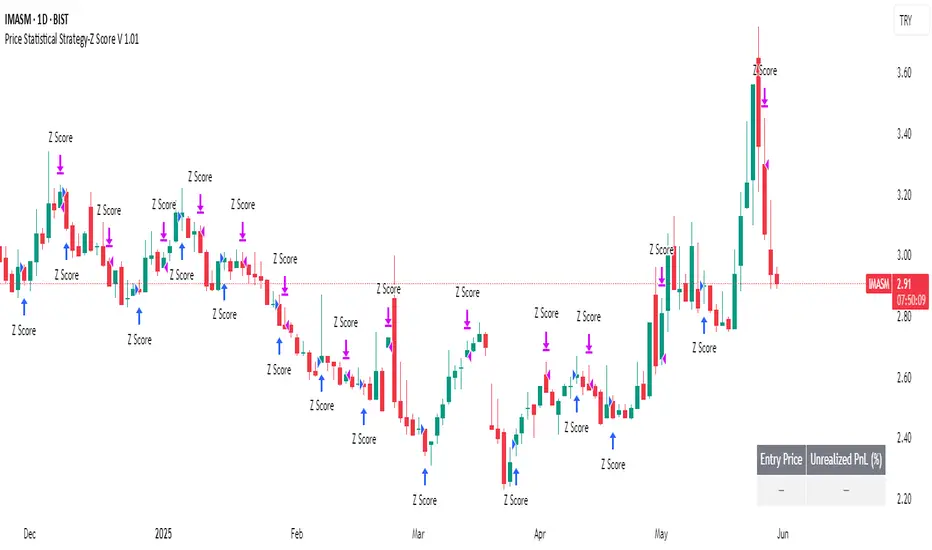
Price Statistical Strategy-Z Score V 1.01
Price Statistical Strategy – Z Score V 1.01
Overview
A technical breakdown of the logic and components of the “Price Statistical Strategy – Z Score V 1.01”.
This script implements a smoothed Z-Score crossover mechanism applied to the closing price to detect potential statistical deviations from local price mean. The strategy operates solely on price data (close) and includes signal spacing control and momentum-based candle filters. No volume-based or trend-detection components are included.
Core Methodology
The strategy is built on the statistical concept of Z-Score, which quantifies how far a value (closing price) is from its recent average, normalized by standard deviation. Two moving averages of the raw Z-Score are calculated: a short-term and a long-term smoothed version. The crossover between them generates long entries and exits.
Signal Conditions
Entry Condition:
A long position is opened when the short-term smoothed Z-Score crosses above the long-term smoothed Z-Score, and additional entry conditions are met.
Exit Condition:
The position is closed when the short-term Z-Score crosses below the long-term Z-Score, provided the exit conditions allow.
Signal Gapping:
A minimum number of bars (Bars gap between identical signals) must pass between repeated entry or exit signals to reduce noise.
Momentum Filter:
Entries are prevented during sequences of three or more consecutively bullish candles, and exits are prevented during three or more consecutively bearish candles.
Z-Score Function
The Z-Score is calculated as:
Z = (Close - SMA(Close, N)) / STDEV(Close, N)
Where N is the base period selected by the user.
Input Parameters
Enable Smoothed Z-Score Strategy
Enables or disables the Z-Score strategy logic. When disabled, no trades are executed.
Z-Score Base Period
Defines the number of bars used to calculate the simple moving average and standard deviation for the Z-Score. This value affects how responsive the raw Z-Score is to price changes.
Short-Term Smoothing
Sets the smoothing window for the short-term Z-Score. Higher values produce smoother short-term signals, reducing sensitivity to short-term volatility.
Long-Term Smoothing
Sets the smoothing window for the long-term Z-Score, which acts as the reference line in the crossover logic.
Bars gap between identical signals
Minimum number of bars that must pass before another signal of the same type (entry or exit) is allowed. This helps reduce redundant or overly frequent signals.
Trade Visualization Table
A table positioned at the bottom-right displays live PnL for open trades:
Entry Price
Unrealized PnL %
Text colors adapt based on whether unrealized profit is positive, negative, or neutral.
Technical Notes
This strategy uses only close prices — no trend indicators or volume components are applied.
All calculations are based on simple moving averages and standard deviation over user-defined windows.
Designed as a minimal, isolated Z-Score engine without confirmation filters or multi-factor triggers.
Pine Script® strategy
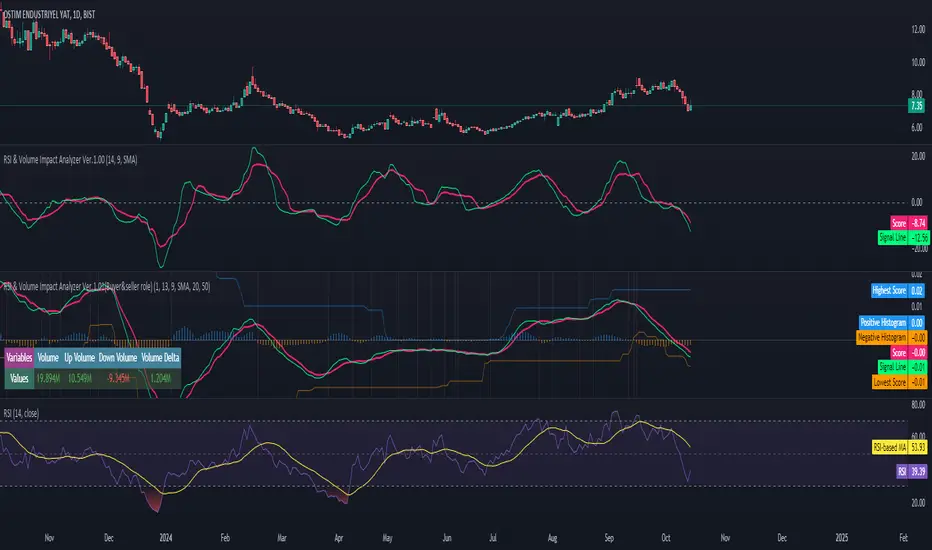
RSI & Volume Impact Analyzer Ver.1.00Description:
The RSI VOL Score indicator combines the Relative Strength Index (RSI) and volume data through a mathematical calculation to assist traders in identifying and confirming potential trend reversals and continuations. By leveraging both momentum (RSI) and volume data, this indicator provides a more comprehensive view of market strength compared to using RSI or volume alone.
How It Works:
This indicator calculates a score by comparing the RSI against its moving average, adjusted by the volume data. The resulting score quantifies market momentum and strength. When the score crosses its signal line, it may indicate key moments where the market shifts between bullish and bearish trends, potentially helping traders spot these changes earlier.
Calculation Methods:
The RSI VOL Score allows users to select between several calculation methods to suit their strategy:
SMA (Simple Moving Average): Provides a balanced smoothing approach.
EMA (Exponential Moving Average): Reacts more quickly to recent price changes, offering faster signals.
VWMA (Volume Weighted Moving Average): Emphasizes high-volume periods, focusing on stronger market moves.
WMA (Weighted Moving Average): Applies greater weight to recent data for a more responsive signal.
What the Indicator Plots:
Score Line: Represents a combined metric based on RSI and volume, helping traders gauge the overall strength of the trend.
Signal Line: A smoothed version of the score that helps traders identify potential trend changes. Bullish signals occur when the score crosses above the signal line, while bearish signals occur when the score drops below.
Key Features:
Trend Identification: The score and signal line crossovers can help confirm emerging bullish or bearish trends, allowing traders to act on upward or downward momentum.
Customizable Settings: Traders can adjust the lengths of the RSI and signal line and choose between different moving averages (SMA, EMA, VWMA, WMA) to tailor the indicator to their trading style.
Timeframe-Specific: The indicator works within the selected timeframe, ensuring accurate trend analysis based on the current market context.
Practical Use Cases:
Trending Markets: In trending markets, this indicator helps confirm bullish or bearish signals by validating price moves with volume. Traders can use the crossover of the score and signal line as a guide for entering or exiting trades based on trend strength.
Ranging Markets: In ranging markets, the indicator helps filter out false signals by confirming if price movements are backed by volume, making it a useful tool for traders looking to avoid entering during weak or uncertain market conditions.
Interpreting the Score and Signal Lines:
Bullish Signal: A bullish signal occurs when the score crosses above the signal line, indicating a potential upward trend in momentum and price.
Bearish Signal: A bearish signal is generated when the score crosses below the signal line, suggesting a potential downward trend or weakening market momentum.
By mathematically combining RSI and volume data into a single trend score, the RSI VOL Score indicator provides traders with a powerful tool for identifying trend shifts early and making more confident trading decisions.
Important Note:
The signals generated by this indicator should be interpreted in conjunction with other analysis tools. It is always advisable to confirm signals before making any trading decisions.
Disclaimer:
This indicator is designed to assist traders in their decision-making process and does not provide financial advice. The creators of this tool are not responsible for any financial losses or trading decisions made based on its signals. Trading involves significant risk, and users should seek professional advice or conduct their own research before making any trading decisions.
Pine Script® indicator
Nitin Swing TradingThis is a CPR which indicates pivot points based on monthly price action.
The Orange line acts as a resistance area, blue lines act as pivot point/CPR and green one is support.
One can study retrospective chart to analyse how market has respected these Support and Resistance levels.
A guide on how to trade using this indicator?
1. If you see the resistance is broken after multiple attempt - We can Go Long
2.If you see price going down below CPR, We can Go Short
3.If you see price taking support at support level - We can Go Long.
Risk reward should always be 1:1 then gradually increase it to 1:2 & 1:3
It is advised to consult with your financial advisor before taking any trade just based on any indicator. You have to manage risk before entering any trade.
Pine Script® indicator